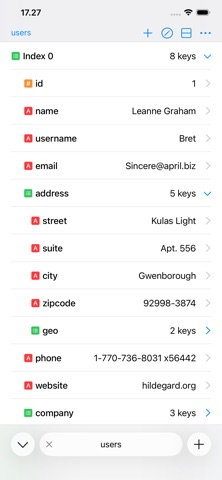
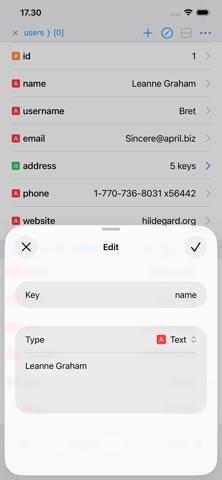
Jayson is a JSON viewer and editor for iPhone and iPad. Browse JSON as a structure, edit values, and save your changes back to the file.

Whether you're inspecting an API response, checking a config file, or making a quick fix on the go, Jayson turns raw JSON into something you can actually read and change.

BROWSE AND EDIT

- Open JSON files stored on your device or in iCloud Drive.
- Toggle between a structured table view and syntax highlighted text.
- Add new values and keys, and save your changes back to the file.
- Parse text or the contents of a URL from your clipboard into JSON.
- Highlight a key from a child of an array to get a quick overview of your data.

TABS, SPLITS, AND WINDOWS

- Switch between files, or different objects in a single file, using tabs.
- Compare JSON in a single file or across files using multiple splits.
- Open multiple windows on the iPad.

WORKS WITH SHORTCUTS

Jayson integrates with Shortcuts, which comes in handy for debugging API calls, previewing JSON files, and building workflows around JSON.

- Pass a response from Get Contents of URL to Jayson to see how it is structured.
- Open JSON as a document you keep working on, or as a temporary preview.
- Format JSON and hand the result to the next action, using spaces or tabs.

FREE, WITH AN OPTIONAL UPGRADE

Jayson's core functionality is free. Browsing, editing, saving, splits, Shortcuts, and working with up to two tabs at a time cost nothing.

A one-time in-app purchase enables having more than two tabs open at once, switching between light and dark themes, and personalizing the app icon, accent color and type icons.

One purchase, no subscription.