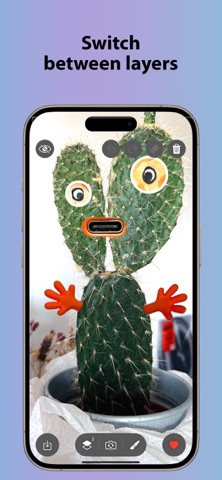
Drawr turns your live camera view into a simple, fast canvas. Stamp with shape-brushes, erase, work on two layers, then export as a transparent PNG or a camera-backed JPG—straight to Photos. Minimal, fast, fun.

FEATURES

Live camera background + quick camera switch (front/back).

Shape brushes & eraser: soft round, outline circle, pentagon, star, flower; adjustable brush size.

Two editable layers (Bottom/Top) with one-tap layer toggle and opacity cycling (33/66/100).

Precise export controls: choose PNG (transparent, no camera) or JPG (includes camera); pick 6/9/12 MP portrait 9:16.

Save to Photos or automatically to a dedicated “DRAWR” album (created on first use with permission).

Works offline; no sign-in.

WHY CREATORS LOVE IT

Real-time composing over a live view—see results as you draw.

Fast by design: fewer taps from idea to saved image.

Clean interface: just the essentials—brushes, eraser, layers, save.

HOW IT WORKS

Open the app and allow Camera & Photos access.

Point the camera, pick a shape-brush and size, toggle layers/opacity, use the eraser as needed.

Tap Save. Choose PNG for transparent artwork (no camera) or JPG to include the camera background; set resolution in Settings.

PRIVACY

No accounts. Your creations are saved locally to your Photos library (optionally into the “DRAWR” album).

IN-APP PURCHASE

7-day trial. Saving is available during the trial; after it ends, a one-time purchase unlocks saving permanently (Restore supported).

SUPPORT

Questions or feedback? We’d love to hear from you.