Textorium gives you the WordPress editing experience with static site architecture
Textorium gives you the WordPress editing experience with static site architecture. Browse your posts in a table, click one, edit in a visual editor, preview on your site. The fact that it's Hugo and Markdown and Git underneath is an implementation detail you don't have to think about.

**Write, don't configure**

Switch between a visual editor and source view with one click. Auto-save means you never lose work. Choose your font, adjust the size, and write. The metadata panel shows your frontmatter fields visually — dates get date pickers, tags get token chips, booleans get toggles. No YAML editing required.

**See how you're doing**

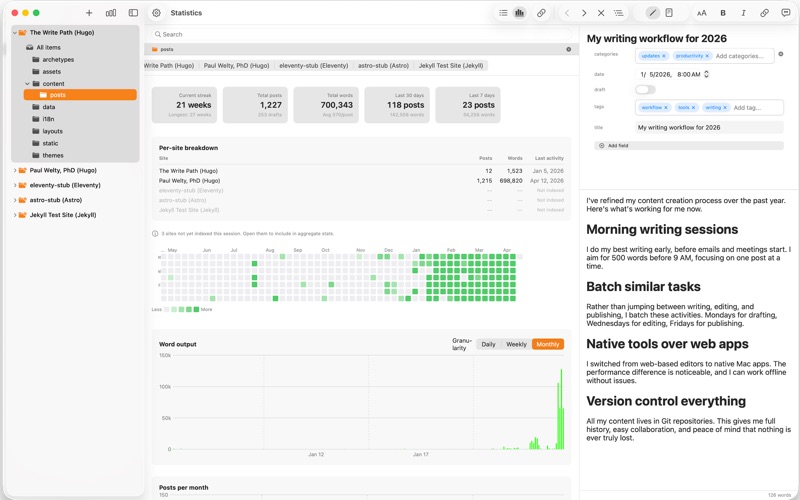
The writing statistics dashboard (Cmd+2) shows your publishing cadence as a GitHub-style heatmap, your word output over time, and your current writing streak. If you manage multiple sites, stats aggregate across all of them. It's the first time you can see your entire publishing history in one view.

**Catch problems before your readers do**

The broken link checker (Cmd+Shift+L) scans every post for internal links and images that point to files that don't exist. It understands how Hugo, Jekyll, Eleventy, and Astro resolve paths — so it catches what your SSG would catch, before you build. The readability panel shows grade level, sentence length, and passive voice in real time.

**Navigate your content**

Browse hundreds of posts in a native table view with customizable columns. Sort by date, title, draft status, or word count. Filter by tags, categories, or any frontmatter field. Click a folder in the sidebar to scope the table to just that section. The outline panel shows your document's heading structure with click-to-jump.

**Your files, your machine**

Point Textorium at your site folder and start writing. No import, no database, no cloud. Your Markdown files stay where they are. Textorium reads them, you edit them, it writes them back. Works offline, respects macOS sandboxing, collects zero data.

**Works with your SSG**

Textorium auto-detects Hugo, Jekyll, Eleventy, and Astro projects. Each SSG gets the right directory scanning, path resolution, and dev server configuration. Start your dev server from the context menu with the right flags — Hugo even gets --buildDrafts --buildFuture so you see everything.

**Multi-site management**

Switch between sites instantly from the sidebar. Each site keeps its own column layout, timezone, and field configuration. The statistics dashboard can show individual site stats or aggregate across your entire portfolio.

**What's included:**

- Visual and source editing modes with custom fonts
- Writing statistics dashboard with heatmap, charts, and streaks
- Broken link and image checker with SSG-aware path resolution
- Readability metrics (Flesch-Kincaid, passive voice, sentence length)
- Outline/TOC navigation panel
- Multi-site management with per-site settings
- Customizable table view with sorting, filtering, and folder scoping
- Frontmatter editor with custom fields, nested structures, and featured image display
- Dev server integration with port check and SSG-appropriate commands
- Per-site timezone and dev server port configuration
- Auto-save, search, property filters, word count
- Copy file and copy pathname from context menu
- Hugo, Jekyll, Eleventy, and Astro support
- Dark mode, keyboard shortcuts throughout

**Privacy first**

No analytics. No tracking. No cloud services. No account required. Your content stays on your Mac.