HEXPal: Pick any color. Get the format you need. Instantly.

HEXPal is a free, open-source macOS menu bar app for picking colors and getting codes in your preferred format.

Built for developers and designers.

What's New
• 8 Copy Formats - Choose how you want your color: HEX, RGB, HSL, OKLCH, CSS Variable, Tailwind, SwiftUI Color, or UIColor. Set your preferred format in Preferences; it applies to every pick.

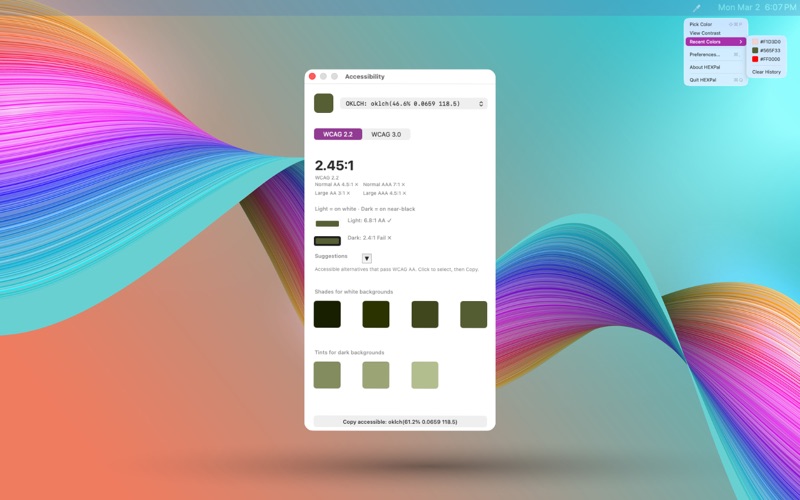
• Accessibility Contrast Checker - View Contrast shows your color against light (white) and dark (near-black) backgrounds. Switch between WCAG 2.2 and WCAG 3.0 (APCA) to match your design standard.

• Accessible Color Suggestions - If your color fails contrast, HEXPal suggests shades for light backgrounds and tints for dark backgrounds. All suggestions pass WCAG AA. Click any suggestion to preview and copy.

• View Contrast Panel - Opens from the menu or after picking. Uses your last picked color, clipboard, or recent colors or launches the picker if none available.

• Recent Colors - Quick access to your last 10 picked colors with visual swatches. One-click copy in your preferred format.

• Global Hotkey - Activate from anywhere with ⌘⇧P (customizable). Works from any application.

• Zero Permissions - Uses Apple's native color picker and standard shortcuts. No Accessibility, Screen Recording, or other permissions required.

• Preferences - Customize hotkey, copy format, contrast standard, and launch at login (macOS 13+). Immediate feedback when settings are saved.

Getting Started
1. Press ⌘⇧P or click the menu bar icon
2. Click any color on screen
3. Your color is copied in your preferred format—paste with ⌘V

Requirements
• macOS 10.15 (Catalina) or later
• Zero permissions required — works immediately