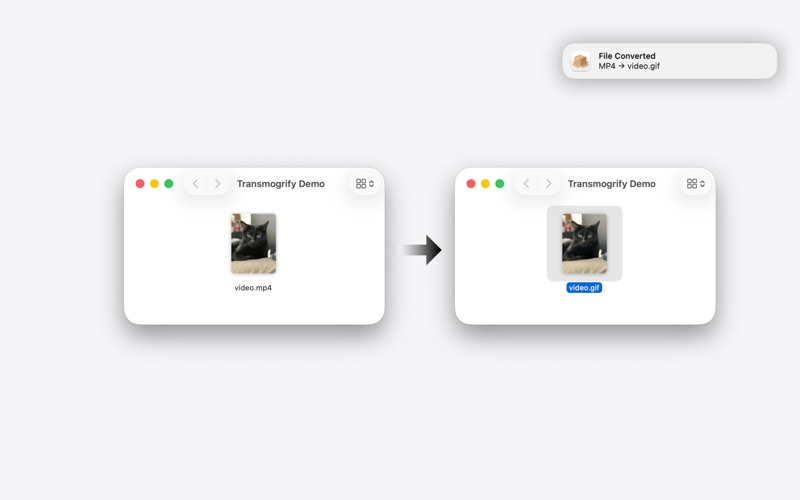
If you can rename a file, you already know how to use Transmogrify.

Transmogrify is a lightweight macOS menubar utility that converts files automatically when you change their file extension.

Rename photo.png to photo.jpg and the file is converted instantly.
No importing. No exporting. No separate apps or workflows.

Your filesystem becomes the interface.

How it works

• Choose folders to watch
• Rename a file’s extension
• Transmogrify detects the real file format and converts the contents to match

It runs quietly in the background from your menubar.

Built-in safety and visibility

• Undo conversions to instantly restore the original file
• Conversion history to review recent conversions, successes, and failures

Mistakes are reversible, and conversions are always visible.

Why Transmogrify?

Most conversion tools require you to open an app, import files, choose settings, and export them somewhere else.

Transmogrify removes the workflow entirely.
If renaming a file feels obvious, Transmogrify feels natural.

Supported formats

• Images: JPG, PNG, HEIC, WebP, GIF, TIFF, BMP, AVIF, and more
• Audio: MP3, WAV, AAC, FLAC, OGG, Opus, AIFF, M4A
• Video: MP4, MOV, MKV, WebM, AVI, GIF
• Text: JSON, YAML, plist

Designed for

• Developers
• Designers
• Power users
• Anyone who wants file conversion to feel invisible

Transmogrify stays out of your way and works where your files already live.