Keep your Mac awake — intelligently.

Always On is a smart menu bar utility that ties wakefulness to what
you’re actually doing. Start a session manually, or use activity-based
“While…” sessions that end automatically when your task ends.

Intelligent wake sessions for macOS.

Always On keeps your Mac’s display awake only when it should be — and
stops when it shouldn’t.

Use simple timed sessions, schedule until a specific time, or activate
powerful “While…” sessions that automatically start and stop based on
your activity.

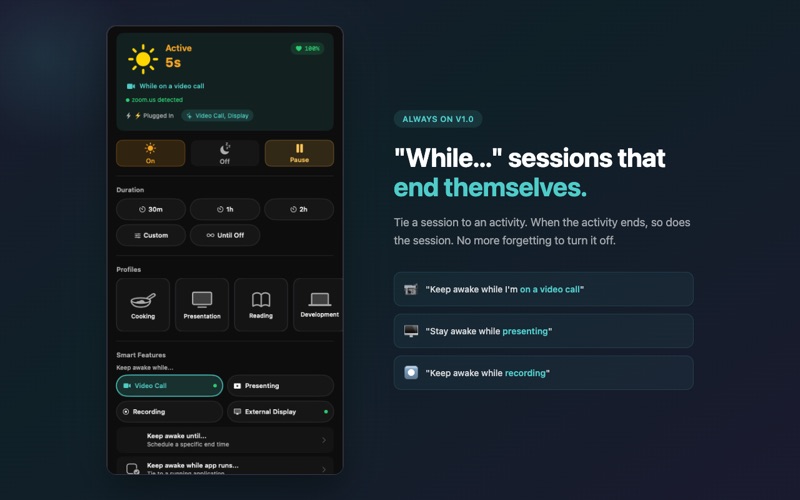
“While…” Sessions That End Themselves

Keep your Mac awake while: • On a video call • Presenting • Recording
your screen • Using an external display • Running a specific app

When the activity ends, the session ends. No more forgetting to turn it
off.

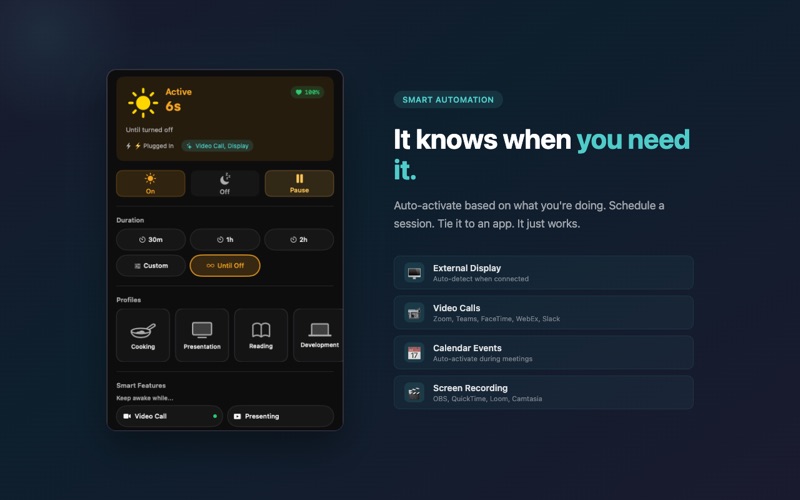
Smart Automation

Always On can automatically activate based on: • Video calls (Zoom,
Teams, FaceTime, WebEx, Slack) • Presentations (Keynote, PowerPoint) •
Screen recording (OBS, QuickTime, ScreenFlow, Loom, Camtasia) • Focus
mode • Calendar events

Detection is performed locally using standard macOS APIs.

Precise Session Control

• 30m, 1h, 2h quick presets • Custom durations up to 12 hours • Schedule
until a specific time • Indefinite “Until Off” mode • Profile-based
presets for different workflows • Live countdown with progress bar •
Pause and resume anytime

Power-Aware by Design

Always On respects your system.

• Battery-aware reminder intervals • Automatic timer reset when plugging
or unplugging • Critical battery auto-stop at 25%

Uses the standard macOS display sleep assertion. It does not override
forced sleep, lid-close sleep, or system energy schedules.

Private by Design

• No network access • No data collection • No tracking • Fully sandboxed
• No background agents or helper tools

All data remains on your Mac.

Optional Built-In Awareness

Configurable reminders for: • Eye breaks • Posture • Hydration •
Late-night sessions

Designed to be helpful — never intrusive.