Recopy is the clipboard manager with a memory. Everything you copy — text, images, code,
  links, files — is saved, instantly searchable, and now understood by on-device AI that
  summarizes, rewrites, and translates. Nothing ever leaves your Mac.

  Try every Max feature free for 14 days — no credit card required. Then keep the Free plan
  (200 items) forever, or unlock more with a one-time purchase. No subscriptions, ever.

  - ON-DEVICE AI (MAX)
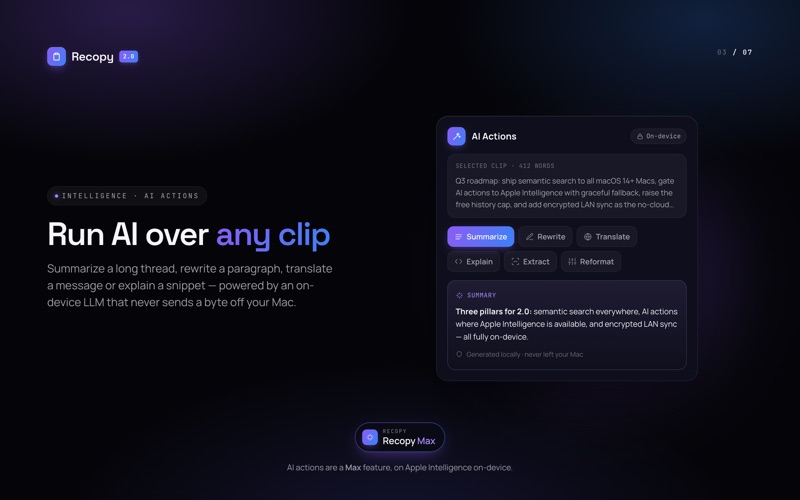
  Recopy's AI runs entirely on your Mac through Apple Intelligence — nothing is ever
  uploaded.
  • Smart search — find clips by meaning, not just keywords ("the AWS error from Tuesday")
  • AI Actions — summarize, rewrite, translate, explain code, extract — one keystroke from
  Quick View
  • Auto-summaries of long clips so you can scan your history at a glance
  • Custom AI instructions to tailor every action
  Requires macOS 26 with Apple Intelligence; otherwise Recopy falls back gracefully.

  - INSTANT ACCESS
  Open your history with one shortcut (⌥V). Click any item to paste instantly, or jump to a
  clip with ⌘1–⌘9. Navigate with arrow keys, search by typing, and filter by type. Build a
  paste stack, paste as plain text, or find clips from Spotlight.

  - CAPTURES EVERYTHING
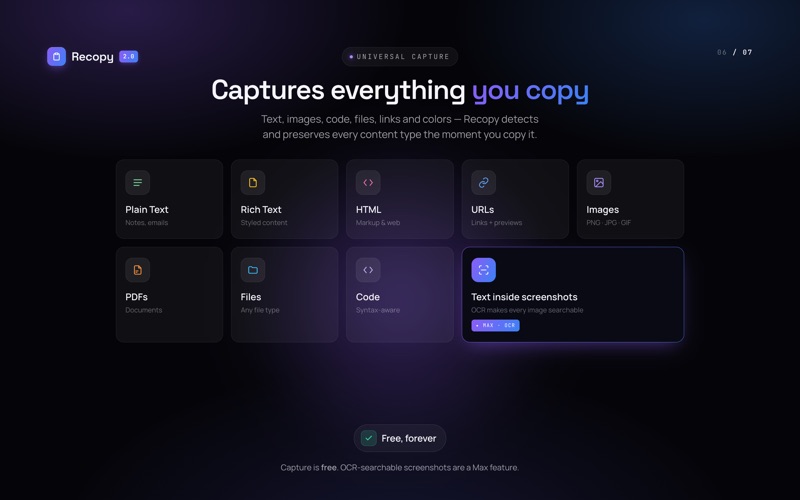
  Recopy detects and preserves 10+ content types automatically: plain & rich text,
  auto-detected code, URLs, images (PNG, JPEG, GIF, TIFF, WebP, HEIC), PDFs, files & folders,
  colors (hex), HTML, and spreadsheets.

  - POWERFUL SEARCH
  Keyword search is free for everyone — and even finds text inside screenshots with on-device
  OCR. Filter by type with one-click chips: Text, Images, URLs, Files, PDFs, Code. Max adds
  smart, natural-language search across your history.

  - PRIVACY & SECURITY, BUILT IN
  Your clipboard holds sensitive data — Recopy protects it:
  • Secret redaction — passwords, API keys, and tokens are auto-detected, hidden, and
  revealed only with Touch ID (Free)
  • Airgap mode — one switch makes Recopy do zero network connections, provably (Free)
  • Automatically ignore password-manager fields (Free)
  • App & pattern exclusion — never capture from the apps you choose (Pro)
  • Secure-Enclave encryption, a Touch ID-locked Vault, and full app lock (Max)

  - PIN, PREVIEW & ORGANIZE
  Pin your most-used clips so they never expire. Right-click for quick actions — Copy,
  Preview, Pin, Delete. Press Space to preview in a floating window — images, scrollable
  text, or file details.

  - 100% PRIVATE
  No accounts. No sign-ups. No cloud. No tracking. Everything is stored locally in a SQLite
  database on your Mac. We literally can't see what you copy.

  - FULLY CUSTOMIZABLE
  • Keep history from 1 day to forever
  • Store up to 50,000 items
  • Enable or disable specific content types
  • Customize your global keyboard shortcut
  • Launch at login automatically
  • Auto-expiring (ephemeral) clips (Pro)

  - LIQUID GLASS DESIGN
  A stunning translucent interface with frosted-glass panels, smooth animations, and native
  macOS vibrancy, in automatic light and dark.

  — PLANS (one-time purchase, no subscription) —

  FREE
  • 200 clipboard items
  • All 10 content types
  • Keyword & OCR search, filters, pins
  • Secret redaction, Airgap mode & privacy controls
  • 100% local and private

  PRO ($4.99)
  • Everything in Free
  • Unlimited history (up to 50,000 items)
  • App & pattern exclusion
  • Auto-expiring (ephemeral) clips

  MAX ($19.99)
  • Everything in Pro
  • On-device AI — smart search, AI Actions, auto-summaries & custom instructions
  • Secure-Enclave encryption, Vault & Touch ID app lock
  • Encrypted LAN sync between your Macs (coming soon) — peer-to-peer, end-to-end encrypted,
  no cloud

  Already on Pro? Upgrade to Max for $14.99 — pay only the difference. All Max features are
  free for your first 14 days.

  Requires macOS 14 (Sonoma) or later. On-device AI features require macOS 26 with Apple
  Intelligence on Apple Silicon.