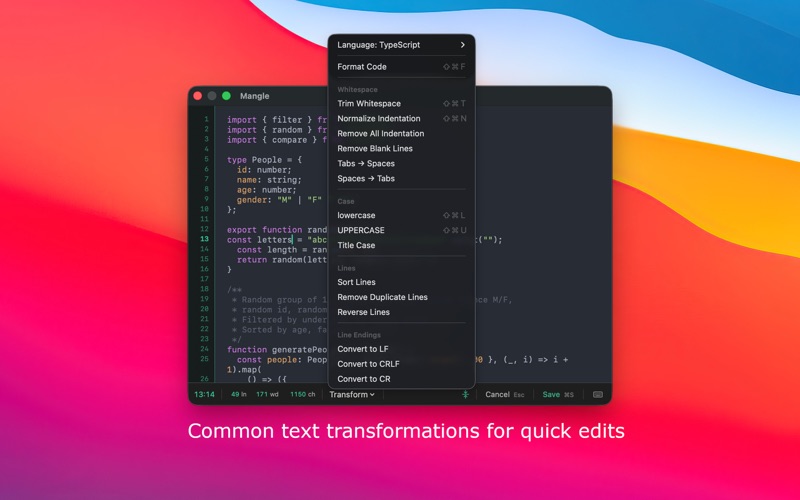
Mangle lives in your menu bar and turns your clipboard into a lightweight code workbench
Mangle lives in your menu bar and turns your clipboard into a lightweight code workbench.

Whether you're cleaning up a snippet from Slack, fixing inconsistent indentation, or preparing code for a PR comment - Mangle gets it done in a keystroke.

Real-world use cases

• Received a JavaScript function in Slack as a wall of unformatted text? Open Mangle, hit Format, done.
• A teammate shares CSS with mixed tabs and spaces? Normalize it before it hits your codebase.
• Reviewing a SQL snippet with 2-space indent but your project uses 4? Fix it instantly.
• Need to share code publicly but it contains sensitive names? Quickly edit and obfuscate before copying.
• Copied multiple things and lost the first? Mangle keeps a full clipboard history.
• On a call and need clean YAML in a doc? Format and paste without leaving your current app.

Format code with Prettier

Format JavaScript, TypeScript, CSS, SCSS, HTML, Markdown, YAML, and GraphQL using industry-standard Prettier - built right in.

Transform in one click

• Normalize indentation
• Convert tabs ↔ spaces
• Trim whitespace
• Change text case

Clipboard history

Never lose a snippet. Mangle keeps a history of everything you copy, with syntax highlighting to quickly find what you need.

Keyboard-first

Work without touching your mouse.
Customisable global shortcuts, VS Code–style navigation, and a quick Format shortcut (⌘⇧F).

Minimal and fast

No subscription. No bloat.
Mangle is a native macOS app that stays out of your way until you need it.