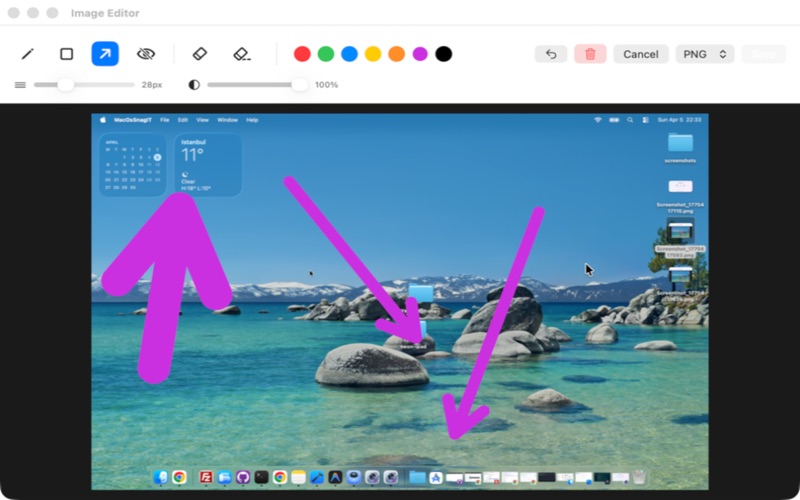
Taking screenshots has never been this powerful and effortless! SnagITFast is your all-in-one screen utility that lets you capture your screen without waiting and make professional edits on it in seconds.

Forget about basic screenshot tools. Whether you need to capture the full screen, pick a specific window, or snip a custom area, SnagITFast instantly hides itself to get a perfectly clean shot and immediately welcomes you to its powerful editing canvas!

KEY FEATURES:
- Smart Capture Modes & Hotkeys: Choose from Full Screen, Specific Window, or Area Pick modes. Instantly trigger captures using native system keyboard shortcuts (⌘⇧F, ⌘⇧R, ⌘⇧W). SnagITFast magically hides its own UI during capture, keeping your screenshots flawless!
- Capture Delay & Countdown: Need to capture a dropdown menu, hover state, or specific interaction? Set a custom delay (up to 60 seconds) with a sleek fullscreen visual countdown.
- Flexible Output Routing: Choose where your screenshots go. Route captures directly to the Editor, copy them straight to your Clipboard, or save them instantly to your disk.
- Premium Annotation Tools: Draw arrows, add text, or highlight with geometric shapes (rectangles, circles, lines). Customize thickness and opacity to create notes exactly the way you want.
- Sequential Step Markers: Guide others step-by-step by placing sequential numbered bubbles (1, 2, 3...) on your screenshots with a single tap.
- Magnifier Lens: Zoom in on tiny details with a gorgeous magnifying glass overlay that enlarges image parts by 2x.
- Apple Vision OCR (Live Text Extraction): Instantly extract text from any screenshot. Read, copy, and paste text from images using high-accuracy native OCR technology.
- Privacy Shield (Blur Tool) & Background Eraser: Blur sensitive data like passwords and IDs with a professional blur stroke, or use the background eraser to remove unwanted image parts.
- Smart Eraser & Undo: Made a mistake? No worries. Use the object eraser to instantly remove drawings or rewind your steps with unlimited 'Undo'.
- Built-in Capture History: Access a collapsible sidebar gallery showing your last 10 screenshots. Reload any previous capture back into the editor with one click!
- Global Multilingual Support: Clear, step-by-step system permission (TCC) guides translated into all major world languages (English, Turkish, German, French, Spanish, Italian, Portuguese, Russian, Chinese, Japanese, and Hindi).
- Smooth Native Mac Experience: Built entirely for the macOS ecosystem. Lightweight, lightning-fast, and battery-friendly!

Whether you are preparing meeting notes, reporting a bug to your dev team, or guiding a friend... SnagITFast will be your ultimate daily driver.

Download now and start managing your Mac screen like a pro!