macOS has always been missing one thing Windows users take for granted: the ability to right-click inside a folder and instantly create a new file
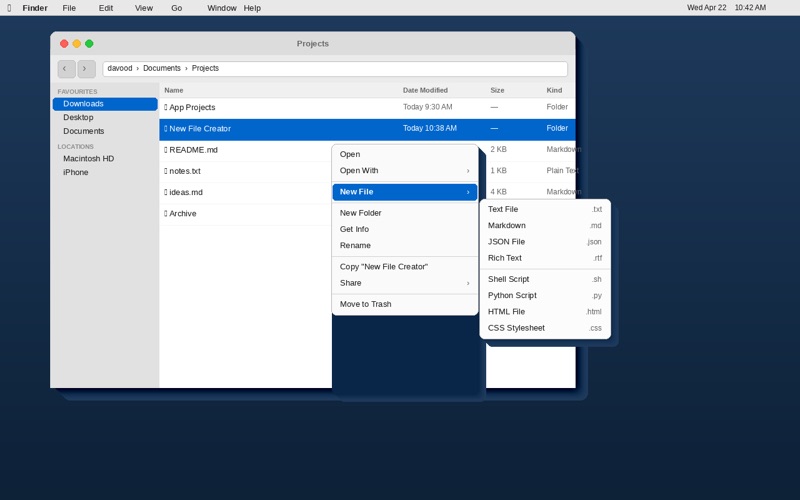
macOS has always been missing one thing Windows users take for granted: the ability to right-click inside a folder and instantly create a new file. New File Creator fills that gap — cleanly, natively, and exactly how you'd expect it to work.  Once enabled, a "New File" option appears in your Finder right-click menu wherever you work. Pick a file type, and a new file appears instantly — named, selected, and ready to rename.

Eight built-in templates
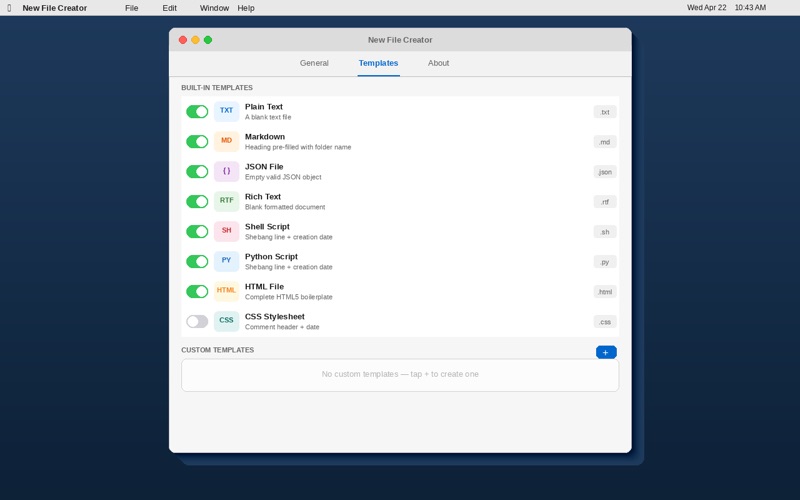
•	Plain Text (.txt) — a blank slate for notes and quick edits
•	Markdown (.md) — pre-seeded with a heading matching the folder name
•	JSON (.json) — an empty, valid JSON object
•	Rich Text (.rtf) — a blank document ready for formatted writing
•	Shell Script (.sh) — with shebang line and creation date
•	Python Script (.py) — with shebang line and creation date
•	HTML (.html) — a complete, valid HTML5 boilerplate
•	CSS (.css) — with a folder-name comment and date

Build your own templates
Need a file type that isn't in the list? Create your own. Open the Templates tab, tap +, and define any extension and starting content you like. Templates support dynamic variables that fill in automatically at creation time:

•	{{date}} — today's date in your locale
•	{{time}} — current time in your locale
•	{{folder}} — the name of the destination folder
•	{{username}} — your macOS display name
•	{{year}} — the current four-digit year

Simple setup
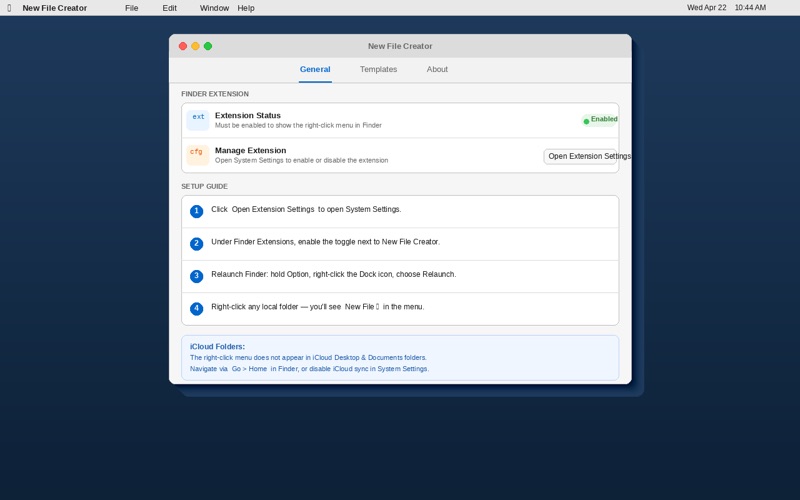
1.	Open New File Creator.
2.	Click "Open Extension Settings" and enable the extension under Finder Extensions.
3.	Relaunch Finder: hold Option, right-click the Finder icon in the Dock, choose Relaunch.
4.	Right-click any local folder — you will see "New File ▶" in the context menu.

Privacy first
New File Creator does not collect any data, connect to the internet, or require an account. All templates and preferences are stored locally on your Mac. Nothing ever leaves your machine.

Note on iCloud folders
Due to macOS sandbox restrictions that apply to all third-party Finder extensions, the right-click menu does not appear in folders synced via iCloud Desktop & Documents. It works in all local folders — Downloads, Movies, Music, Pictures, and your Home folder. If you use iCloud Desktop & Documents, navigate to those folders via Go → Home in Finder, or disable iCloud Desktop & Documents sync in System Settings → Apple ID → iCloud Drive.