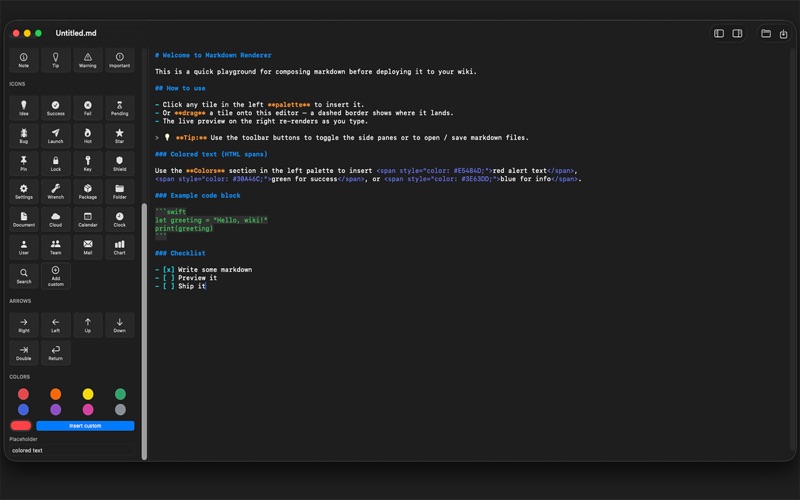
Write, preview, and ship Markdown - without memorizing the syntax.

Markdown Renderer is a native macOS editor built for people who write documentation, wiki pages, READMEs, and notes every day. Drag a component from the side palette, drop it onto your page, and watch the result render live next to your source - all in a single, focused window.

A workspace built for real writing
• Three resizable panes - component palette, source editor, live preview - each adjustable so you can give yourself room where you need it.
• Syntax-highlighted Markdown source: headings, emphasis, code, links, and HTML tags are color-coded for easy scanning.
• Live preview that refreshes on every keystroke - what you see is exactly what your wiki, README, or site will show.

A visual component palette
• Click or drag tiles to insert headings, bullet and numbered lists, task lists, code blocks, blockquotes, tables, links, images, and horizontal rules.
• Pre-built callouts - Note, Tip, Warning, Important - give your documents a clean, consistent voice.
• A library of inline icons: status, security, tools, arrows, and more - inserted as plain Unicode so they render anywhere.
• "Add custom" tile opens macOS's full Character Viewer so any emoji or symbol can be dropped straight into your document.

Colored text - even on wikis that don't natively support it
Pick a color from the side palette, or choose a custom one, and Markdown Renderer inserts a portable HTML span for you. Your alert text, status badges, and highlights work on any platform that allows inline HTML, and the live preview shows the color as you type.

Export anywhere
• Save as plain .md - Git-friendly, paste-friendly, wiki-friendly.
• Export as HTML - a complete, self-contained file with light and dark-mode styles built in, ready to serve from any web server.
• Standard New, Open, Save, Save As, and Revert commands with the keyboard shortcuts you already use.

Designed for macOS
• Built with SwiftUI and AppKit - fast, low-memory, no Electron.
• Adapts beautifully to light and dark mode, in the app and in your exported HTML.
• Zoom in or out - great for big monitors, small laptops, and presentations.
• Toggle the palette and preview panes independently when you want to focus on writing.
• Open as many documents in as many windows as you need.

Whether you're maintaining a personal wiki, drafting release notes, polishing API documentation, or just keeping notes you'd like to look good - Markdown Renderer gets the typing out of your way and the formatting on the page.