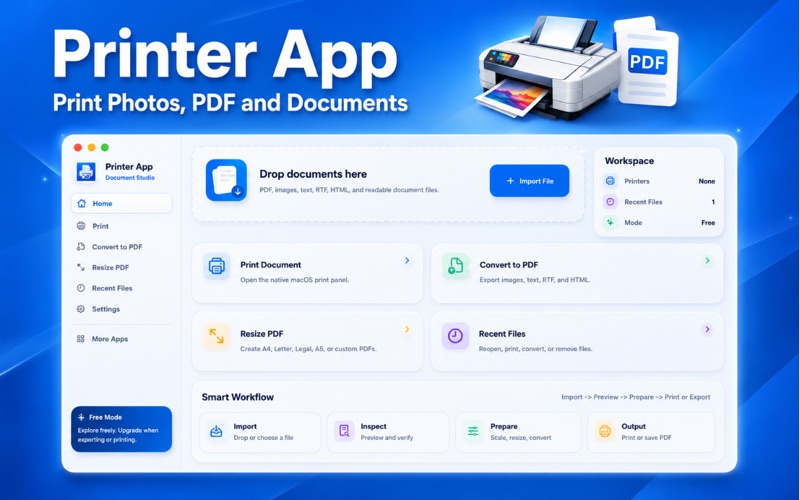
Printer App is a clean and simple printing utility for macOS designed to help you print documents, preview PDFs, resize PDF pages, convert supported files to PDF, and manage everyday printing from one
Printer App is a clean and simple printing utility for macOS designed to help you print documents, preview PDFs, resize PDF pages, convert supported files to PDF, and manage everyday printing from one easy place.

Whether you want to print a PDF, convert an image to PDF, resize a document before printing, or send a supported file  to your printer, Printer App gives Mac users a smooth and minimal workflow for common document tasks.

Print PDFs, Documents & Images on Mac

Printer App helps you print supported files using the macOS printing system. Import a file, preview it, and continue to the print panel where you can choose your available printer, paper size, copies, page range, scaling, and other print options.

The app works with printers already added or configured on your Mac, including supported wireless, network, and USB printers.

Convert Files to PDF

Need to convert an image or document into PDF? Printer App includes a simple PDF conversion tool for supported file types.

You can use Printer App to:

• Convert images to PDF on Mac
• Convert JPG, JPEG, or PNG to PDF
• Convert text files to PDF
• Save supported documents as PDF
• Create printable PDF files
• Prepare files before printing

Resize PDFs Before Printing

Printer App helps you resize PDF pages before saving or printing. Choose common page sizes such as A4, Letter, Legal, A5, or use a custom size.

This is useful when you want to change PDF page size, fit content to a new page, or prepare a document for office, school, home, or personal printing.

Simple Preview & Drag-and-Drop Import

Preview your PDF before printing or converting. Printer App gives you a clean document preview experience so you can check your file before taking action.

You can also drag and drop supported files into the app or use the Import File button to select documents manually from your Mac.

Recent Files

Printer App keeps your recent files organized so you can quickly reopen, print, convert, or remove documents from your recent list.

Frequently Asked Questions

What is Printer App?

Printer App is a macOS printing utility that helps you print documents, preview PDFs, resize PDF pages, convert supported files to PDF, and manage recent files.

Can I print PDF files on Mac?

Yes. You can import a PDF, preview it, and print it using the macOS print panel.

Which printers can I use?

Printer App works with printers that are already installed, added, or supported by macOS. If your printer is available in the macOS print system, you can use it through Printer App.

Can I convert images to PDF?

Yes. Printer App can convert supported image files such as JPG, JPEG, and PNG into PDF format.

Can I resize a PDF before printing?

Yes. You can change the page size of your PDF before saving or printing.

Main Features

• Print PDF files
• Print documents on Mac
• Print images on Mac
• Convert supported files to PDF
• Convert images to PDF
• Resize PDF pages
• Preview PDFs before printing
• Save resized PDFs
• Save converted PDFs
• Drag and drop file import
• Recent files section
• macOS print panel support
• Clean and simple design

Subscriptions
• Weekly: $7.99
• Monthly: $12.99
• Yearly: $12.99 with a 3-day free trial

Printer App makes printing, PDF resizing, and file-to-PDF conversion easier on macOS. Import your file, preview it, prepare it, and print with confidence.

Privacy Policy - https://smartiprinter.blogspot.com/2026/06/privacy-policy.html
Terms of Use - https://smartiprinter.blogspot.com/2026/07/terms-of-use.html