Convert any engineering sketch to a CAD-ready DXF file - in seconds.

SketchDXF: AI-Powered CAD Converter

The fastest way from paper sketch to machining. No CAD software. No training. Just snap a photo.

Built for the Workshop, Not the Design Studio

• Convert hand-drawn parts into CAD-ready DXF files
• Create DXF files without CAD software
• Perfect for CNC, laser cutting, and fabrication workflows

How It Works

Step 1 - Sketch It

Draw your part on white paper. Add dimensions such as width, height, diameter, radius (R), hole positions, slots, and bend lines.

Step 2 - Scan It

Take a photo or upload your drawing. SketchDXF detects geometry, dimensions, and engineering annotations.

Step 3 - Download DXF

Receive a CAD-compatible DXF file in seconds, ready for CAD software or CNC workflows.

Supported Drawing Types

SketchDXF converts 2D engineering drawings into CAD-ready DXF files.

Supported inputs:
• Hand-drawn 2D engineering sketches
• PDF engineering drawings
• Technical 2D drawings of flat sheet metal parts

Important

SketchDXF is designed for 2D engineering drawings only.

It does not convert:
• Photos of real-world objects
• 3D parts or assemblies
• Machines or equipment
• Furniture or products
• Random shop floor photographs

If you upload a photograph of a physical object, the AI cannot generate an accurate DXF because it is trained to interpret 2D engineering drawings, not 3D objects.

What the AI Understands

• Circles, holes, arcs, slots, rectangles, polygons and ellipses
• Corner radii, chamfers and rotation angles
• Fold/bend lines and bend angles
• Countersinks (CSK), counterbores (CBORE) and thread specs (M6x1.0)
• Bolt circle patterns
• Tolerances and GD&T annotations

Professional DXF Output

• CAD-compatible DXF
• Layers: CUT, HOLES, FOLD, CHAMFER and DETAIL
• Optional dimension annotations
• 1:1 scale output

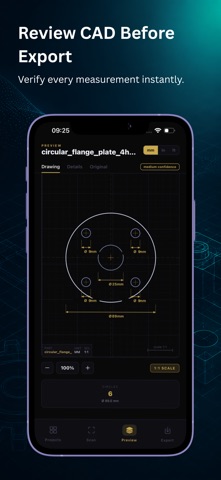
In-App CAD Preview

• Preview generated drawings
• Zoom and inspect details
• Switch between Drawing, Details and Original Sketch

Human Review (Starter & Pro)

If the AI cannot generate the correct DXF, request a Human Review directly in the app.

• Manual DXF creation by our design team
• Receive the corrected DXF back in the app
• Available with Starter and Pro only
• Not available on the Free plan

Cloud Sync & History

• Secure scan history
• Access scans from any device
• View original sketch and DXF together

Free to Start

• Free - 2 AI scans/month
• Starter - 10 scans/month or 120/year
• Pro - 25 scans/month or 300/year

Subscriptions are managed through your App Store account.

Who Uses SketchDXF?

Sheet Metal Fabricators • CNC & Laser Cutting Operators • Mechanical Engineers • Product Designers • Manufacturing Teams • Engineering Students • Toolmakers

Stop redrawing. Start scanning.

Download SketchDXF and convert your first engineering drawing in under 60 seconds.

Terms of Use (EULA): https://sketch-to-cad.onrender.com/terms

Privacy Policy: https://sketch-to-cad.onrender.com/privacy