Quick Sub 2: Quick and Easy Video Subtitling for Dummies
Quick Sub 2 is a streamlined, professional-grade application designed to overlay custom subtitle objects onto video files (MOV/MP4)
Quick Sub 2: Quick and Easy Video Subtitling for Dummies

Quick Sub 2 is a streamlined, professional-grade application designed to overlay custom subtitle objects onto video files (MOV/MP4).  It provides deep creative control by separating text from its container, allowing for independent management of margins, background colors, corner radii, and rotation angles.  Users have full authority over font families, typography, color, and alignment.

- Key Features -

Precision Editing: Independent control over text styling and container geometry ensures perfect layout alignment for every subtitle.

・ Workflow Efficiency: Apply size and style parameters across multiple subtitle objects with a single menu command, drastically reducing repetitive tasks.
・ Robust Undo/Redo: An integrated Undo Manager provides full history support, allowing for stress-free iterative design.
・ Project Persistence: Save your progress natively with the .qsub2 file format. Double-click or drag-and-drop these files to instantly restore your workspace.
・ Streamlined Export: High-performance video rendering with real-time progress monitoring. If a workflow needs adjustment, the export process can be safely aborted at any time.

- What’s New in Quick Sub 2 -

・ Built from the Ground Up: Fully re-engineered using the SwiftUI framework for improved stability and a modern, fluid user experience.
・ Expanded Object Library: Now includes dedicated rectangle-type subtitle objects for more versatile visual compositions.
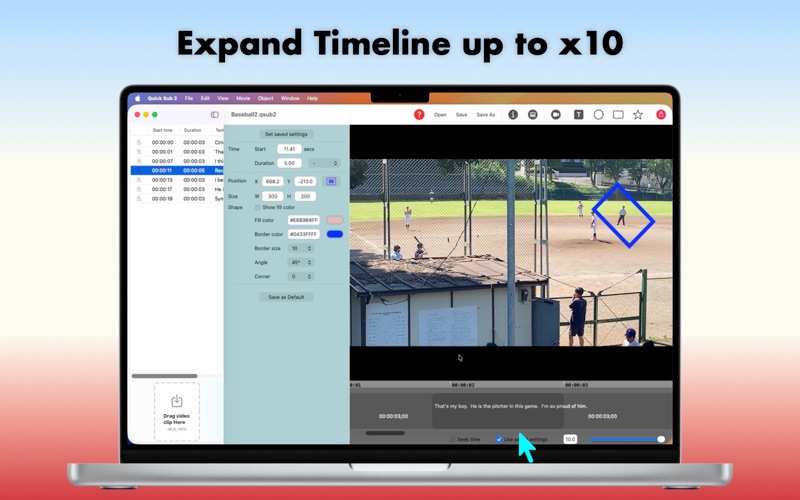
・ Dynamic Timeline Control: * Precise Rescaling: Easily adjust the duration of subtitle objects on the timeline with a zoom factor ranging from 0.1x to 10x.
・ Intuitive Timing: Effortlessly drag subtitle objects left or right on the timeline to refine the start time.
・ Direct Canvas Manipulation: Position subtitle objects with precision by dragging them directly over the movie screen.
・ Advanced Styling: Rotate selected subtitle objects to achieve the perfect angle for your layout.
・ Enhanced Workflow Safety: Full implementation of undo and redo stacks, ensuring every design change is reversible.