




Description
flowy is a powerful and lightweight macOS app designed to make animated screen recordings and video editing effortless
flowy is a powerful and lightweight macOS app designed to make animated screen recordings and video editing effortless.

With a one-time purchase and lifetime updates included, flowy provides the tools you need to produce professional-quality videos.

If you're creating tutorials, presentations, content for social media, or want to capture your screen smoothly: flowy is for you.


Key Features:

- Automatic Effects:
No need to spend hours setting up effects or animations, as they are automatically applied based on your cursor movements and interactions.

- High-Quality Screen Recording:
Record your screen in stunning detail with support for all native resolutions and customisable frame rates. Capture displays, windows or cropped areas.

- Audio, Microphone & Camera Support:
Record audio from your microphone and/or system audio. Overlay your camera feed (positioning and size modifiable in the editing stage) with a camera preview during recording - won't be shown in the final project.

- Video Editing:
Edit your recordings with precision using tools like timeline scrubbing, fullscreen preview, zoom effects, video trimming, background editing, camera editing, and more.

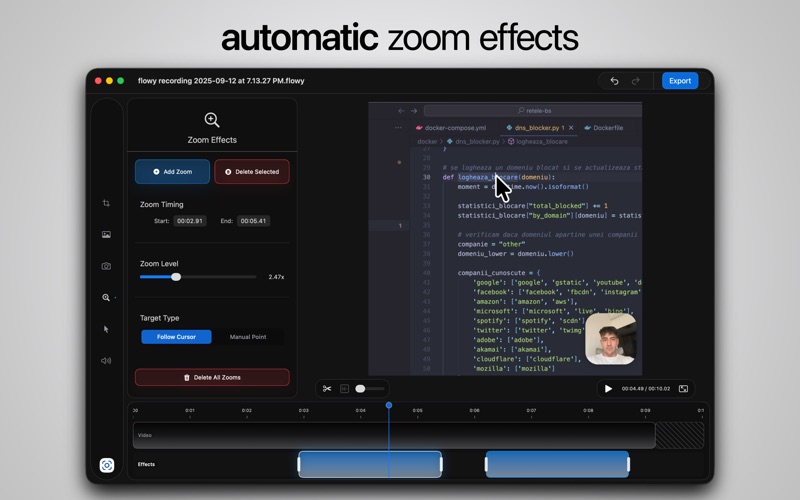
- Zoom Effects:
Effortlessly zoom in on important areas of your screen during recording or editing. The cursor is automatically followed in a zoom effect, but you can also target a manual selected point. "Zoomed In" functionality embeds the screen recording into the selected aspect ratio, with the cursor being followed around when going out of bounds.

- Background Effects:
Upload your own image or choose a background: you have a wide selection of images such as Landscapes, Abstract or Gradients. Add blur and shadows, edit the recording size relative to the background and more.

- Cursor Effects:
Your cursor is automatically enhanced by using a modern pointer with a bigger scale and tilt so it looks like it flows around the screen, but you can also choose from a variety of pointer styles and effects to make it stand out even more.

- User-Friendly Interface:
A clean and intuitive design ensures that both beginners and professionals can create polished videos with minimal effort.


-------------------------------
Find a full list of functionalities at https://getflowy.app/#current-features
分类: 图像与设计(11098)
版本: 1.8.3
BundleId: com.vladfurtuna.flowy
开发者: FRTN SOFTWARE S.R.L.
最近更新: 2026-07-25
