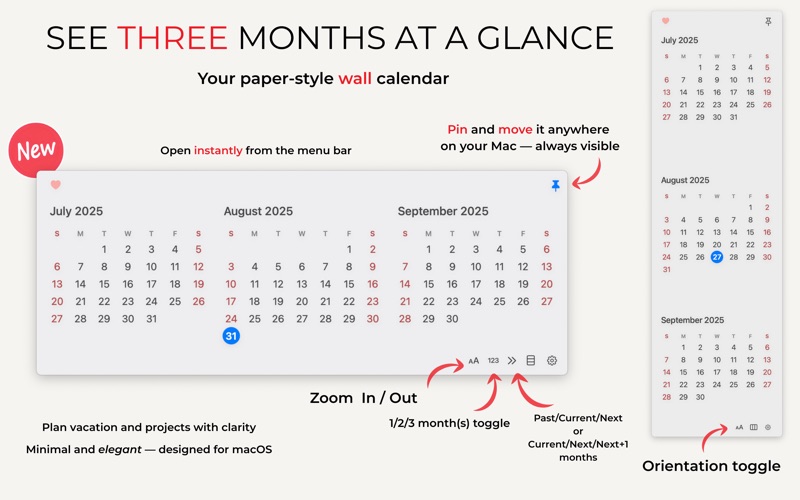
A print-style three month mini-calendar for your Mac.
Pin it on screen in vertical or horizontal layout, zoom in/out for your preference and stay organized at a glance — three full months right in your menu bar or always visible on your desktop. No app switching, no clutter, no distractions.

Why Triada Wall Calendar?

Calendar apps  only show one or two months at a time, and often bury the calendar behind layers of UI, tabs, or Notification Center.

Triada does something more focused: it shows three full months together, in a layout that mimics a clean print calendar. You can pin it on your screen, keep it floating above windows, or open it instantly from your menu bar — no digging, no scheduling clutter.

It’s not for managing invites, meetings, or time zones — it’s for seeing time itself.

Key Features

 •	Three-Month View
	See past, present, and next month together in one continuous layout.

 •	Pinned or Menu Bar Access
	Open Triada from your menu bar or keep it pinned on screen, vertically or horizontally — just like a real wall calendar.

•	Light and Dark Mode Support
	Adapts automatically to your system appearance.

 •	Simple and Distraction-Free
	Focus purely on dates — no events, notifications, or animations.

 •	Offline and Private
	No account, no syncing, no data collection. Works entirely on your device.

Perfect For

	•	Planning a trip or vacation
	•	Laying out deadlines or timelines across months
	•	Seeing the big picture at a glance
	•	Visual thinkers who prefer clarity over clutter
	•	Users who print wall calendars or use sticky notes — and want the same overview digitally

Triada Wall Calendar is not a replacement for your calendar app — it’s a complement.
A quiet, persistent calendar that’s always one glance away.