FlareBar puts your entire Cloudflare® account in your menu bar. No more hunting through dashboards, jump directly to any resource with a single click.

FlareBar gives you one-click access to all your Cloudflare resources from your Mac menu
bar. Whether you need to check Worker metrics, update DNS records, or manage R2 buckets,
everything is just a click away.

SUPPORTED RESOURCES

• Workers & Pages Projects
• Domains (with 55+ subpages organized into categories)
• D1 Databases
• KV Namespaces
• R2 Buckets
• Queues
• Workflows
• Durable Objects
• Zero Trust


CORE FEATURES

• One-Click Navigation - Jump directly to any Cloudflare dashboard page
• Deep Subpage Access - Quick access to metrics, settings, deployments, and more
• Spotlight-Style Search - Press (Cmd+Shift+,) to search across all resources and pages
• Offline Caching - Fast access even when offline
• Secure Storage - API tokens stored safely in macOS Keychain
• Smart Organization - Resources grouped by type with collapsible sections
• Page Customization - Show/hide and reorder pages within each resource type

PRO FEATURES ($49.99 one-time purchase)

• Unlimited Accounts - Connect and switch between multiple Cloudflare accounts
• Real-Time Metrics - View requests, errors, CPU time, and bandwidth directly in the menu
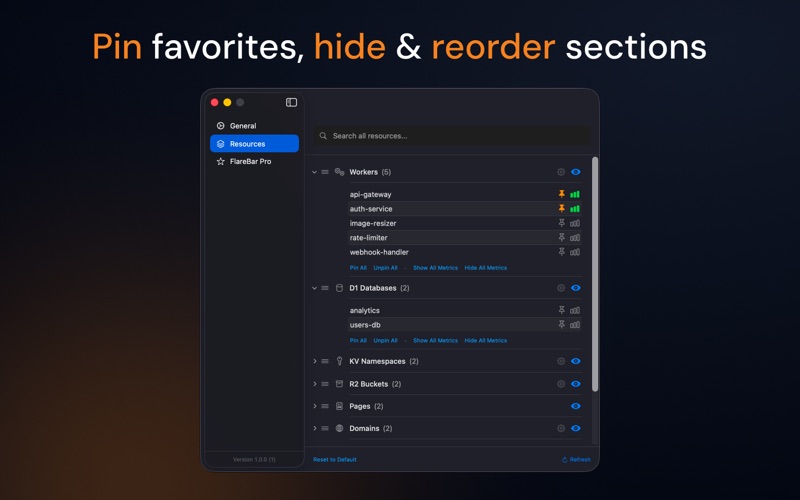
• Pin Favorites - Keep frequently used resources at the top
• Menu Customization - Reorder and hide resource sections and resources
• Advanced Page Controls - Pin, hide, and reorder individual pages within resources
• Configurable Time Ranges - View metrics for 1 hour, 24 hours, or 7 days
• Auto-Refresh - Automatically update metrics at your preferred interval

DESIGNED FOR EFFICIENCY

Built specifically for macOS developers and DevOps teams who work with Cloudflare daily.
FlareBar eliminates the friction of navigating the Cloudflare dashboard by bringing
everything you need to your menu bar.