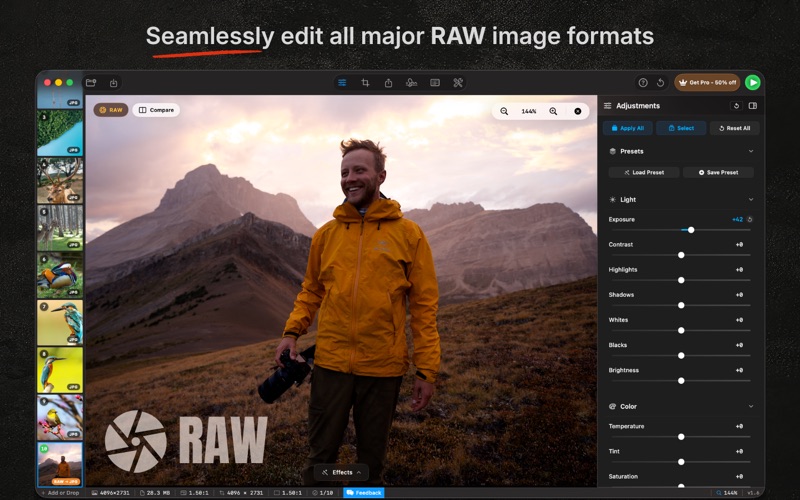
RapidPhoto is a professional batch photo editor for macOS. Edit and export hundreds of images in minutes — all processing runs locally on your Mac for complete privacy.

Optimized for Apple Silicon: 60+ MP files load instantly and sliders respond in real time.

  BATCH PROCESSING
  • Import up to 500 photos at once, or directly from Apple Photos
  • Apply crops, adjustments, watermarks, and metadata to every image with one click
  • Export in 10 formats: JPEG, PNG, TIFF, HEIC, WebP, AVIF, JPEG 2000, BMP, GIF, PDF

  PROFESSIONAL ADJUSTMENTS
  • Exposure (±3.0 EV), contrast, highlights, shadows, whites, blacks, temperature, tint, vibrance, saturation
  • Clarity, dehaze, texture, sharpness, noise reduction, grain, bloom, vignette
  • 5-point tone curves with shadow / midtone / highlight control
  • HSL color mixer across 8 bands — hue, saturation, luminance per color
  • One-click auto-enhance per parameter

CREATIVE PANEL
• Spot Removal: Remove blemishes and distractions
• 10 Brushes: Dodge, Burn, Blur, Sharpen, Smooth, Warm, Cool, and more
• Smart Selection: AI Subject, Background, People, and custom masks
• Linear Gradient: Lightroom style graduated adjustments
• Portrait Retouch: Whiten eyes, smooth skin, enhance lips
• Full Control: Adjustable strength, feather, undo, and redo

PORTRAIT PANEL
• Blemish Remover: Heal pimples, scars, and spots
• Reshape: Adjust eyes, nose, lips, cheeks, and jawline
• Retouch: Reduce eye bags and enhance eye contrast
• Eye Makeup: 12 eyeshadow shades plus custom colors
• Eyebrows: Recolor brows with 6 natural shades
• Lip Color: Lipstick presets with adjustable intensity
• Cheek Blush: Natural blush shades with custom blending

  SMART CROPPING
  • 13 aspect ratio presets (1:1, 3:2, 4:3, 16:9, 16:10, 21:9, 4:5, 9:16, and more) plus freeform
  • Drag-to-crop with rule of thirds, golden ratio, diagonal, and center grids
  • Straighten with real-time horizon preview
  • Per-image or batch-wide crop; before/after compare on the canvas

  RAW EDITING
  • Native CR2, NEF, ARW, DNG, and more — full sensor data for maximum detail recovery

  WATERMARKING
  • 48 fonts with full typography control, 9-position grid placement, custom padding
  • Shadows, outlines, background boxes, repeating patterns, image watermarks

  44 EFFECT PRESETS
  • Film: Portra 400/800, Ektar 100, Gold 200, Pro 400H, Velvia 50, Superia 400, Kodachrome, CineStill 800T, Tri-X 400, HP5 Plus, T-Max 100, Delta 3200
  • Color grades: Teal & Orange, Moody Editorial, Split Tone Warm/Cool, Vintage Fade
  • Monochrome: B&W, Sepia, Selenium, Cyanotype, Platinum
  • Stylize: Sapphire, Rose Gold, Neon Glow, Halation, Bloom, Aerochrome
  • Apply to one image or your whole batch

  AI & ON-DEVICE MACHINE LEARNING
  • Background removal, AI upscaling, face detection & blur
  • OCR text extraction, QR / barcode detection, person & scene classification

  METADATA & RENAMING
  • Edit EXIF / IPTC: title, description, copyright, author, keywords — batch-applied
  • Custom prefix, base name, date stamps, sequential numbering with live preview

  KEYBOARD SHORTCUTS
  • ←/→ navigate, ⌘←/⌘→ jump to first/last
  • D mark done, Delete remove, ⌘O open, ⌘⇧O import from Photos, ⌘S save, ⌘E export

  PRIVACY FIRST
  • Zero cloud uploads — every operation runs on your Mac
  • App Sandbox with minimal permissions; all AI runs on device via Apple's Vision and Core ML
  • GDPR-compliant anonymous analytics

  PRICING
  • Free tier: process up to 10 images with basic export
  • Full version: one-time purchase ($29.99) — no subscription

  Privacy Policy: https://raw.githubusercontent.com/om202/My-App-Privacy-Policies/refs/heads/main/RapidPhoto/Privacy-Policy.md
  Terms of Use: https://www.apple.com/legal/internet-services/itunes/dev/stdeula/