AUDIO SELECTOR: Advanced Audio & Device Manager
Total control over your macOS audio environment, right from the menu bar
AUDIO SELECTOR: Advanced Audio & Device Manager

Total control over your macOS audio environment, right from the menu bar.

◆ KEY FEATURES
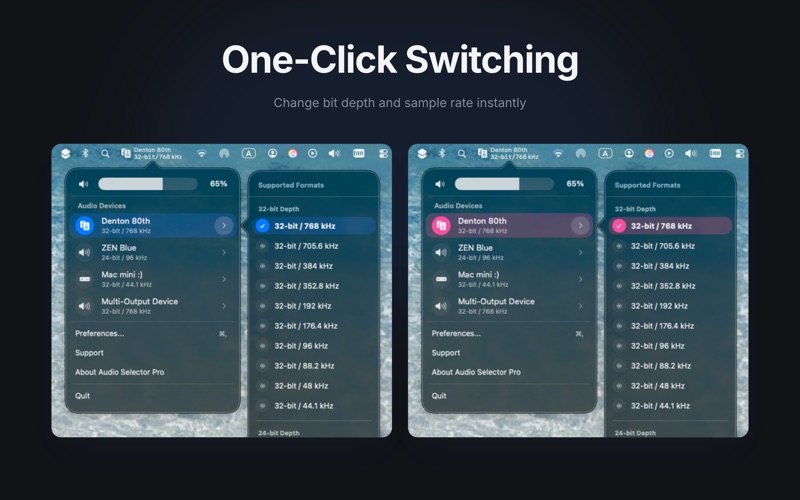
* One-Click Switching: Instantly toggle between speakers, headphones, or DACs directly from the menu bar.
* Instant Format Control: Change bit depth and sample rate (e.g., 32-bit / 768kHz) without opening Audio MIDI Setup.
* Real-time Monitoring: View your active audio format and device status at a glance.
* Native & Lightweight: A minimal, high-performance utility built exclusively for macOS.
* Shortcut Support / Arrow Key Navigation
* Integrated Volume Control

◆ ROON INTEGRATION
* Roon Volume Sync: Automatically detects the output devices on this Mac that Roon is currently playing to and keeps their volume in sync - adjust it from Roon, from Audio Selector, or from your iPhone/iPad, even while Roon holds the device exclusively.

◆ WIRELESS CONTROL
* Audio Selector Remote: Download the free companion app on your iPhone or iPad to switch devices, change formats, and adjust your Mac's volume from anywhere in your room.
* Secure Connection: Keep your Mac safe and ensure only your authorized iOS devices can connect using the new 'Require Pairing' feature.
* Mute & Media Playback: Toggle system mute and control media playback (Music / TV) directly from your iOS device.
* Roon on the Go: See which of your Mac's output devices Roon is playing to and adjust their zone volume straight from your iPhone or iPad.

◆ UNLOCK PRO FOR ADVANCED WORKFLOW
* Advanced Layout Options: Unlock the Dual-Line Format to see more information at a glance.
* Unlimited Display Customization: Break free from display limits and tailor every detail of your information.
* Device Personalization: Customize display name, icon, visibility for each individual audio device.
* L/R Balance Control: Fine-tune your stereo sound. Adjust the left and right audio balance for individual output devices directly from the menu bar popover. (Shown only for devices that support balance control).
* Volume Slider Customization : Personalize your volume control UI by choosing between the classic 'Knob' or the new 'Bar' style.