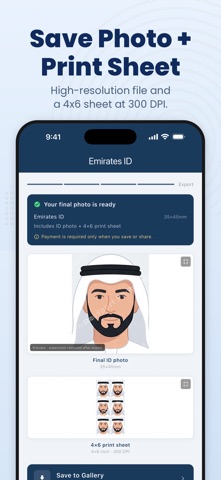
Turn a phone photo into a print-ready passport or ID photo in about a minute. Correct size, clean white background, ready to print at home or upload with an online application.

NOT A GOVERNMENT APP — PLEASE READ
This app is produced by Kiducate Ltd. It is not a government application. It is not affiliated with, endorsed by, or authorised by any government, ministry, embassy, or document issuing authority, and it cannot submit applications or issue documents on your behalf.

It is a photo editing tool. It resizes and prepares a photo you take yourself to published dimensions. It cannot guarantee that any authority will accept your photo. Always confirm the current requirements with the authority issuing your document before you apply.

HOW IT WORKS
1. Choose the document you need a photo for
2. Take a photo or pick one from your gallery — the app checks your lighting first
3. The background is removed automatically and replaced with plain white
4. Your head is positioned and scaled to the dimensions for that document
5. Save a single photo, or a 4x6 print sheet you can take to any print shop

WHAT YOU GET
• Exact dimensions at 300 DPI, with the density written into the file, not just the pixel count
• Automatic background removal, replaced with a clean white background
• Face detection that positions and scales your head for the document you chose
• A 4x6 print sheet, so one print gives you several copies
• An export that steps quality down to meet a portal's file-size limit without shrinking your dimensions
• Full English and Arabic interface, including right-to-left layout

OFFICIAL SOURCES
The dimensions in this app are taken from these published government specifications. You can check every one of them yourself:

• United Kingdom — HM Passport Office: https://www.gov.uk/photos-for-passports
• United States — U.S. Department of State: https://travel.state.gov/en/passports/apply/help/photos.html
• Schengen visa — European Commission visa policy: https://home-affairs.ec.europa.eu/policies/schengen-borders-and-visa/visa-policy_en
• United Arab Emirates — Federal Authority for Identity, Citizenship, Customs and Port Security: https://icp.gov.ae/en/services/
• Saudi Arabia — Saudi Visa photo specifications: https://visa.visitsaudi.com/Home/PhotoSpecifications
• Kuwait — Kuwait Government Online, Ministry of Interior: https://e.gov.kw/sites/kgoenglish/Pages/Services/MOI/ApplyforPassport.aspx
• Bahrain — National Portal photo requirements: https://www.bahrain.bh/wps/wcm/connect/db16aef8-7052-4568-9273-24b31de7de55/PhotoReq-en.pdf

The same list appears inside the app, under Help & Settings → Official photo spec sources.

OTHER SIZE PRESETS
The app includes further presets as photo sizes only. They are not presented as official specifications and no government source is claimed for them. Check the requirements with your issuing authority before applying.

IMPORTANT FOR SOME COUNTRIES
Germany and France require biometric photos to be submitted digitally by a registered provider or photo booth for national documents. No phone app can produce those. The app warns you before you pay if this applies to what you selected.

ONE PHOTO, SEVERAL DOCUMENTS
Re-crop a photo you have already paid for to a second document, without paying for another background removal.

PRICING
Pay once for a single export, or subscribe monthly if you need several. No account, no sign-up.

Support: https://www.kiducate.eu/passport-photo/support/
Privacy: https://www.kiducate.eu/passport-photo/privacy/
Terms of Use (EULA): https://www.apple.com/legal/internet-services/itunes/dev/stdeula/