Lock the keys. Love the cat.

Cats Lock is a one-click keyboard lock for Mac, built for the moments your cat decides your laptop is the warmest spot in the house. Hit the lock, let her settle in, and get back to whatever you were doing without random typing, deleted documents, or a sudden trip to System Settings.

ONE SHORTCUT, ANY APP
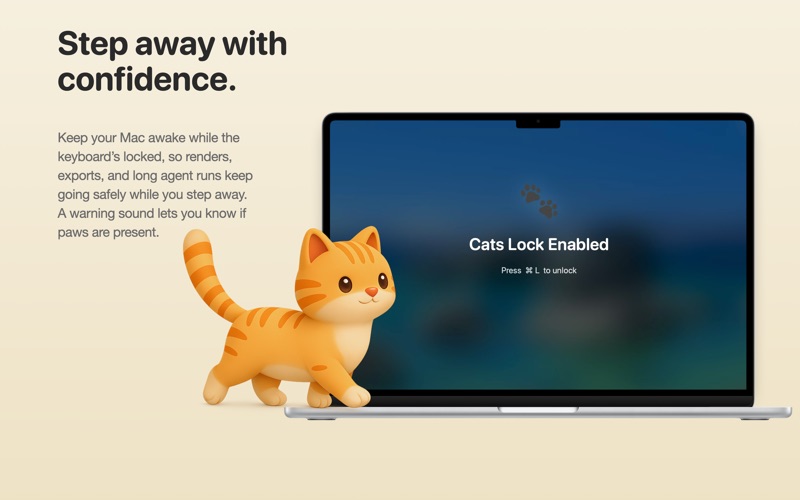
Press ⌘L from anywhere — Safari, Mail, Notes, your terminal — and Cats Lock instantly blocks every key. A friendly overlay shows what's happening; the same shortcut releases it when you're ready. Prefer a different combo? Record your own in Settings.

SMART DETECT (BETA, OPTIONAL)
Turn on Smart Detect and Cats Lock can lock itself the moment it senses cat-style typing, so you don't have to reach for the shortcut when a paw lands on the keys. It runs entirely on your Mac, you choose how sensitive it is, and every auto-lock has a one-tap "That wasn't my cat" if it ever guesses wrong. It's in beta and off by default. Like the optional locks below, it asks for Accessibility once when you turn it on, and never uses Input Monitoring.

KEEP YOUR MAC AWAKE FOR LONG JOBS
Got a long render, export, build, or backup running? Lock the keyboard and turn on Keep Mac Awake so a stray paw, or a sleeping screen, can't interrupt a job that needs to run untouched. Step away and come back hours later to the same locked, wide-awake Mac, with whatever you left running still going.

STEALTH LOCK FOR MEETINGS AND MOVIES
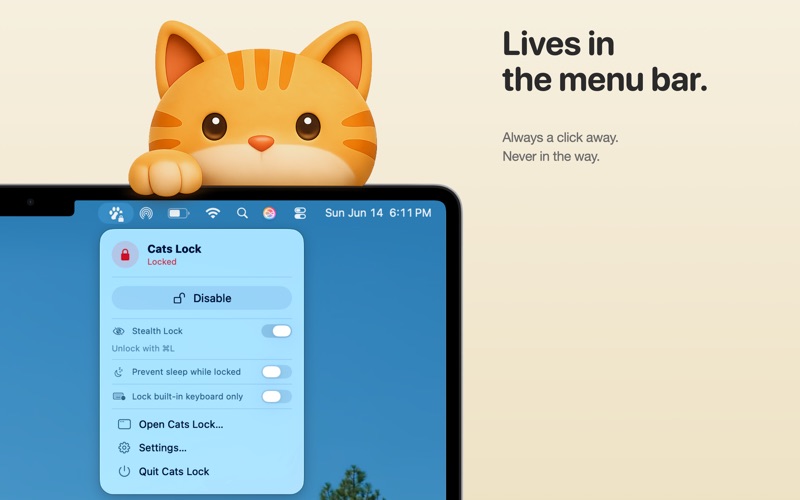
When your sidekick is encroaching and you don't want a visual takeover, flip on Stealth Lock from the menu bar or Settings. The keyboard is blocked with no full-screen overlay and no sound, just a small badge in the corner showing that it's locked and how to unlock.

LOCK THE FUNCTION ROW (OPTIONAL)
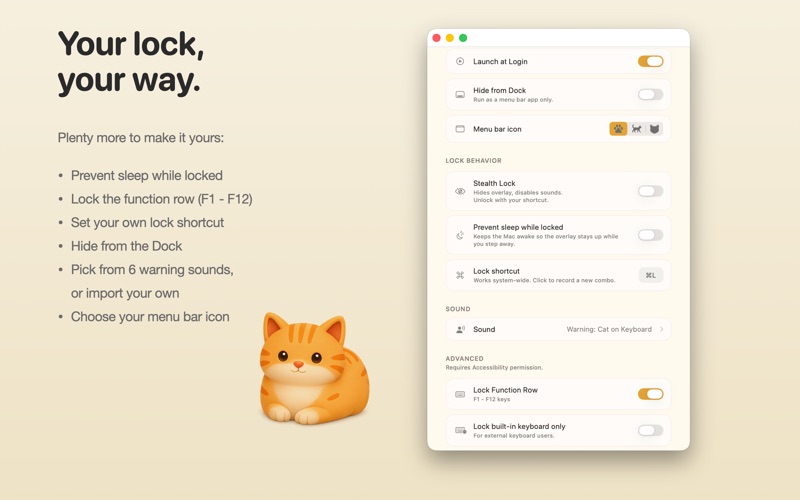
Got a cat that loves the top row? Optionally block the function keys too (F1 through F12), including Mission Control, brightness, volume, and media keys. This feature needs Accessibility permission, so it stays off until you choose to turn it on.

LOCK JUST THE LAPTOP KEYBOARD AND TRACKPAD (OPTIONAL)
Work on an external keyboard? Turn on Lock built-in keyboard to lock just your MacBook's built-in keys, so a cat on the laptop can't type while you keep working on your external. A small badge shows the lock is on, and when an external mouse is connected it has a one-tap button to lock the built-in trackpad too, so a paw can't move the cursor, click, or scroll. A stray Caps Lock press won't leave you stuck in capitals either. It unlocks the moment you unplug the external, so you're never stranded. Like function-row locking, this needs Accessibility permission and stays off until you turn it on.

PICK YOUR DETERRENT
Choose from six built-in sounds, including a spoken "Warning, cat on keyboard" voice prompt — or import your own. Sounds play on each blocked keystroke to help alert you when paws are present. Or stay completely silent.

LIVES IN THE MENU BAR
Cats Lock stays out of your way. Always one click from the menu bar pawprint. Optional Hide from Dock for a pure menu bar experience. Optional Launch at Login. Auto-unlocks when your screen goes to sleep so you're never locked out of your own Mac.

PRIVACY-FIRST
Cats Lock runs entirely on your Mac. No accounts, no cloud, no analytics, no data ever leaves your device. The app is fully sandboxed and uses only standard Mac frameworks. The core lock needs no special permissions. The optional function-row, built-in keyboard/trackpad, and Smart Detect features are the only ones that ever ask for Accessibility, and only if you choose to turn them on. Smart Detect works entirely on your Mac and never uses Input Monitoring.

DESIGNED FOR CAT PEOPLE
Made by a cat owner who got tired of his cat rewriting documents in real time. Every setting exists because a real cat needed it.

REQUIREMENTS
macOS 14.0 (Sonoma) or later. Apple Silicon and Intel Macs supported.