



Description
Aurora Live is a generative visual studio for flowing light art
Aurora Live is a generative visual studio for flowing light art. Open the app and a Metal-rendered field of aurora, nebula, plasma, and ink-like motion fills the screen. Tilt the device, paint with touch, react to live audio level when you choose Sound mode, and capture a high-resolution still or short loop when the composition lands.

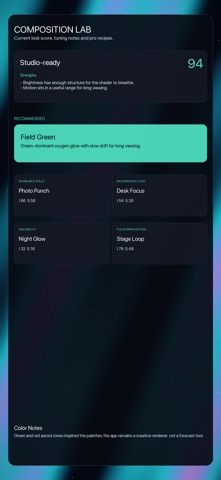
Version 2.1 adds Composition Lab, a pro control room for intentional looks. The Lab scores the current composition, explains what is working, suggests improvements, and provides one-tap recipes for real aurora-inspired green glow, shareable still captures, desk-focus backgrounds, dim night glow, and lively fullscreen loops. Recipes tune palette, intensity, speed, calm motion, warmth, palette cycling, and wander drift together, so users can shape a purpose-built visual instead of guessing at sliders.

Core features:
- Full-screen Metal generative art renderer
- Tilt-driven flow with Core Motion
- Touch painting and luminous tap bursts
- Optional Sound mode that reacts to live audio level
- Capture high-resolution still images
- Record short looping video clips
- Six curated palettes plus custom palette builder
- Saved Moments with thumbnails, rename, reorder, and restore
- Ambient Display with optional clock overlay
- Ambient Slideshow for saved Moments
- Wander Mode for slow variation during longer sessions
- Guided Breath Sync visual pacing
- Sleep timer fade-out
- Composition Lab with current-look audit and pro recipes
- Local settings and no account requirement

Aurora Live is built for fast creative use: open it, tune the look, save a Moment, capture the frame, or let the field run as a living display. The app runs on device and does not send generated art, microphone audio, palette settings, or saved Moments to the developer.
