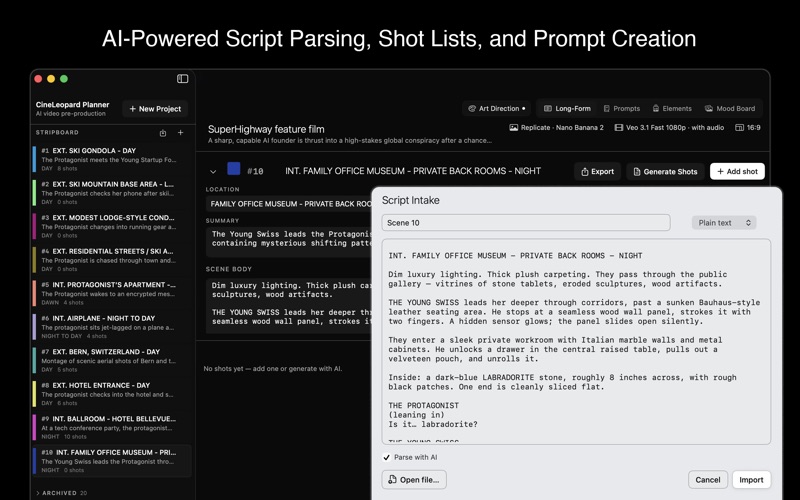
CineLeopard Production Planner is the pre-production workspace for AI video.

Bring a script, or just an idea, and turn it into an organized, shot-by-shot plan. Generate reference images and video clips in the app or import them from your computer. Production Planner is also great for hybrid and traditional video projects.

Three ways to work

• Long-Form — Import a screenplay. Break it into scenes and shots automatically, generate a tailored image prompt for every shot, and build a visual strip board. Generate reference images or import them from your computer. Generate video clips in the shot list or create them on other AI platforms. Organize everything in one place and export it in organized scene folders, ready for your editor.

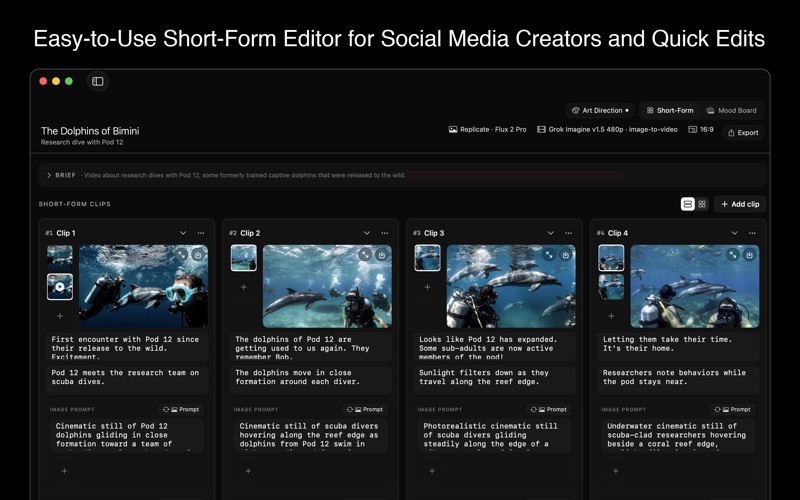
• Short-Form — Go from a brief to a full script, with optional web grounding for topical clips. Generate per-clip image and video prompts, pick reference frames, and add voiceover. Generate video clips and export everything in organized folders, ready to edit. Great for social media and simple marketing videos.

• Large Canvas — A full-width, multi-scene canvas with an optional guided "make me a video" agent pipeline: brief → script → images → clips → voiceover → export a complete, edited video. In creative mode the script is a real screenplay — visual beats plus quoted on-camera dialogue when characters speak. Run the agent, or control every step yourself.

Built for creative consistency

• Elements library (in Long-Form workflow) — Auto-extract your cast, props, and locations, then attach reference images so characters and sets stay consistent across every shot.
• Art Direction (in all workflows) — Set a project-wide mood, palette, and lens language and add reference images that direct the art direction of every generation.
• Mood board & prompt archive — Collect inspiration and save your best prompts to reuse across projects.

Bring your own keys — pay providers directly

Production Planner connects directly to the AI providers you already use — xAI Grok and Grok Imagine, Replicate or Fal (Flux, Nano Banana, Google Veo), Anthropic (Claude) and more. Paste your own API keys once; they're stored securely in your macOS Keychain and sent only to the provider you choose. You're billed by those providers for what you generate — Production Planner never adds a per-generation fee or takes a cut. This helps you manage costs. You only pay for the AI usage you actually need each month instead of being locked into an expensive plan.

Your work stays yours

Everything lives locally on your Mac. No account, no sign-in, no cloud lock-in, no tracking. Quick one-click backups keep your projects safe.

Export to edit

When the plan is ready, export a clean handoff bundle — prompts, reference and generated stills, video clips, and voiceover — organized by scene. Large Canvas projects also export a rich timeline.json manifest for direct import into CineLeopard video editor and other timeline editors, complete with clip timing, captions, and subtitle styling.

Subscription

Production Planner is available with a 1-week free trial, then $9.99/month. The subscription unlocks all basic import and export features. Payment is charged to your Apple Account; the subscription renews automatically unless cancelled at least 24 hours before the period ends. Manage or cancel anytime in your App Store account settings. AI generation additionally requires your own provider API keys, billed by those providers — the subscription does not include AI usage credits.

Production Planner is a native macOS app built with SwiftUI for macOS 14 and later.

Terms of Use (EULA): https://www.apple.com/legal/internet-services/itunes/dev/stdeula/
Privacy: https://cineleopard.com/production-planner/privacy