Boreal PDF helps you turn paper forms, receipts, certificates, contracts, and
application documents into cleaner PDFs from iPhone
Boreal PDF helps you turn paper forms, receipts, certificates, contracts, and
application documents into cleaner PDFs from iPhone.

Start with a camera scan, selected photos, or an imported PDF. Boreal PDF keeps
the workflow focused on the practical steps before submission: straighten the
page, improve text readability, fill in missing marks, reduce file size, and
export a PDF you can review before sending.

Key tools:

- Scan paper documents or import photos and PDFs.
- Auto-crop, rotate, retake, reorder, merge, or split pages.
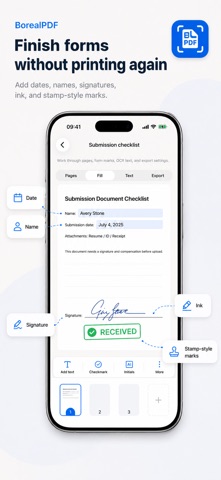
- Add dates, names, signatures, freehand ink, and stamp-style marks.
- Compress PDFs toward common upload limits.
- Run OCR for printed Japanese and English text.
- Preview the final PDF, then save, share, or print it from iOS.

Boreal PDF is local-first by design. The companion website does not provide
cloud document storage, account sync, or server-side PDF processing. OCR works
best on clear printed text; handwriting, glare, low light, and heavy skew can
reduce accuracy, so always review important documents before submitting them.

Boreal PDF is free to start with 5 documents per day. Within that allowance,
form marks, compression, OCR, searchable PDF, and watermarked export stay in
the workflow. Pro removes the daily document limit and unlocks watermark-free
final export. A 24-hour Pro Pass is available for short-term access, alongside
monthly and yearly Pro subscriptions. Current prices, trial availability,
renewal terms, and regional availability are shown on the App Store.

Privacy Policy: https://borealpdf.borealbit.com/privacy
Terms of Use (EULA): https://www.apple.com/legal/internet-services/itunes/dev/stdeula/
Terms of Service: https://borealpdf.borealbit.com/terms