



Description
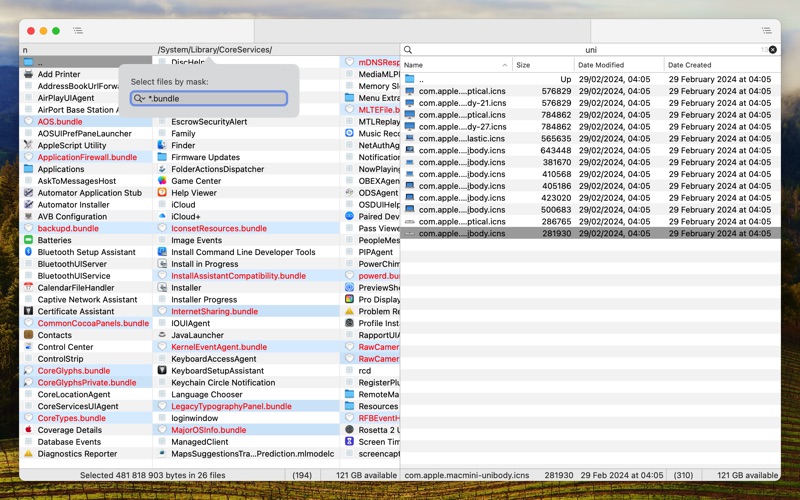
Nimble Commander is a dual-pane file manager designed exclusively for Mac users
Nimble Commander is a dual-pane file manager designed exclusively for Mac users.
Optimized for efficiency, it delivers blazing-fast performance and instant user interface feedback.
While embracing the powerful concepts of traditional dual-pane managers, Nimble Commander features a minimalist and clean UI.
Best of all, it's completely free and open-source.

Key Features:
• Lightning-fast performance: Launches almost instantly, with a small memory footprint and incredible speed.
• Remote connectivity: Connect to FTP, SFTP, WebDAV servers, with support for remote file editing.
• Advanced batch renaming: Use counters, regular expressions, timestamps, casing, capitalization, and more.
• Integration with external tools: Extend functionality seamlessly with your preferred tools.
• Archive browsing: View archives like folders, with support for 7z, rar, zip, tar, iso, and many other formats.
• Customizable UI: Adjust keyboard shortcuts, fonts, colors, and presentation modes (traditional or monospaced text-based UI).
• Powerful search and filtering: Find files instantly as you type, with support for exact and fuzzy searches.
• File editing: Open files with your preferred editor, automatically chosen based on file extensions.
• File attributes editor: Manage permissions, flags, timestamps, and ownership.
• Versatile file viewer: Supports text, hex, and preview modes, syntax highlighting, encoding options, and on-demand loading.
• System and volume information: View detailed volume statistics and system information, with a virtual folder listing active processes.
• File search: Search by name, size, or content (even within archives), optionally presented as a temporary file panel.
• Archive creation: Create encrypted ZIP archives effortlessly.
• Extended attributes support: Browse, create, and modify extended attributes (xattr).
• Spotlight search: Lightweight integration for quick file searches.
• QuickLook integration: Preview files as an overlay, floating window, or within the file viewer.
• File tagging: Create and manage file tags with ease.
• Full keyboard access: Manage files efficiently using only the keyboard.

Questions or Suggestions?
Join the discussion at https://github.com/mikekazakov/nimble-commander/discussions.
分类: 工具(185746)
版本: 1.8.0
BundleId: info.filesmanager.Files-Lite
开发者: Michael Kazakov
最近更新: 2025-12-22
