


Description
This is not your typical notes app
This is not your typical notes app!

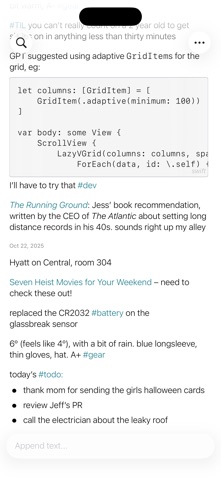
In simpler times, if someone had a thought, they might jot it down in a notebook. If they had another thought, it would go right below the earlier one. No need for organizing, tagging, editing, or correcting old mistakes. If something became distracting, or if it was a TODO item that was done, it could just be crossed out.

This app is that: a note taking app reminiscent of pen and paper, where the only form of organization was the sequence the notes were written in. With Appended, if you have a thought, you append it to your only ongoing note. If some entry is no longer relevant, you can cross it out, or delete it, but there is no temptation -- because there's no ability -- to edit or organize.

Appended differs from a paper notebook in only two ways:

* Notes are (optionally) rendered in markdown. Without a distracting formatting UI, you can bring life to your notes by adding lists, tables, links, or rich text
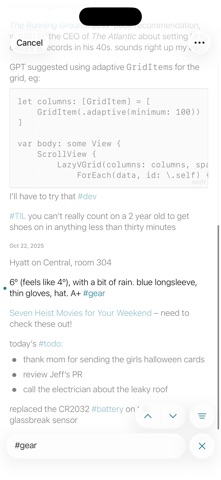
* Notes are full searchable, making it much easier to find something you wrote months ago buried among all your other great ideas

Other great features:

* Encrypted notes sync securely across all your devices (requires iCloud)
* Create notes using Siri by simply saying "Create a note using Appended"
* View or add notes straight from your Apple Watch
* Use the Shortcuts app to append notes, search them, and more
* Optionally hide entries that don't match your search results for a cleaner view, or show them to provide some extra context
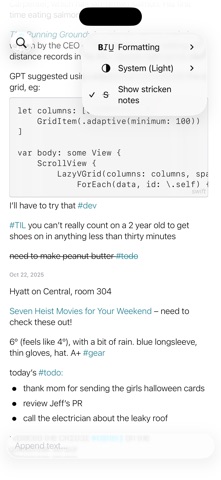
* Strikethrough notes that are no longer important to you, or optionally hide them. Easily toggle whether they're included in search results
* Share individual notes
* Copy notes to your clipboard

Features Appended does NOT have:

* Complicated organization that makes you wonder where you've put old notes
* Super flexible organization that makes you feel guilty when you just need to write something down so you don't forget it
* Todo lists that grow faster than you can manage, resulting in you never using it anymore
* Distracting formatting UIs, making you think about how your notes should look rather than noting them before you forget
* Editing existing notes
Category: Utilities(185746)
Version: 1.6.1
BundleId: com.petercompernolle.Append
Developer: Peter Compernolle
Updated: 2026-02-19
