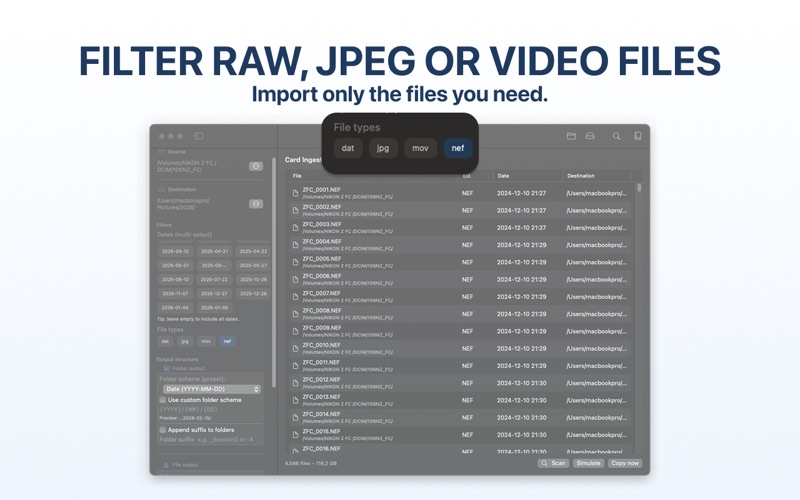
Import RAW photos, JPEGs, and videos from SD cards into organized date folders on your Mac
Import RAW photos, JPEGs, and videos from SD cards into organized date folders on your Mac.

Card Ingest automatically reads each file's EXIF capture date, separates different shooting days, creates your preferred folder structure, detects duplicates, and lets you preview every import before copying begins.

Built for photographers who want a faster, safer, and more organized alternative to manually copying files with Finder.

HOW IT WORKS
Insert your SD card
Choose the file types to import (RAW, JPEG, or video)
Select your destination folder
Preview the complete import
Start the import
IMPORT AND ORGANIZE IN ONE STEP

• Organize photos and videos by EXIF capture date

• Automatically create YYYY / MM / DD folders

• Separate files from different shooting days

• Import only the file types you select

• Create custom folder and filename patterns

• Use tokens such as {DATE} and {COUNTER}

• Detect duplicate files using MD5 verification

• Preview every import with Simulation Mode

Your original files always remain untouched.

WHY CARD INGEST?

Finder can copy files, but it cannot automatically organize every photo by capture date, create date-based folders, rename files, detect duplicates, and preview the entire import before copying.

Card Ingest performs all of these steps automatically, giving photographers a faster, safer, and repeatable import workflow.

BUILT FOR PHOTOGRAPHERS

• Works completely offline

• No account required

• No cloud uploads

• No unnecessary background processes

• Designed specifically for macOS

• Perfect for landscape, wildlife, sports, event, travel, and studio photography

TRY BEFORE YOU BUY

Card Ingest includes 3 full imports so you can test the complete workflow using your own SD cards before upgrading to unlimited imports.

Simulation Mode lets you preview every import before copying, helping you verify folder structures, filenames, and duplicate detection with confidence.


About Subscriptions:

This app offers optional auto-renewable subscriptions to access premium features.

• Annual Plan: Full access, billed yearly
• Lifetime Plan: One-time purchase for permanent access

Subscriptions renew automatically unless canceled at least 24 hours before the end of the current period.
Your iTunes Account will be charged upon confirmation of purchase.
You can manage or cancel your subscription in your App Store account settings at any time.

By using this app, you agree to Apple’s Standard End User License Agreement (EULA):
https://www.apple.com/legal/internet-services/itunes/dev/stdeula/
and our Privacy Policy:
https://appx3.dev/privacy/