This app facilitates creating and managing virtual machines. On Apple Silicon systems, both Mac and Linux virtual machines are supported. On Intel systems, only Linux virtual machines are supported.

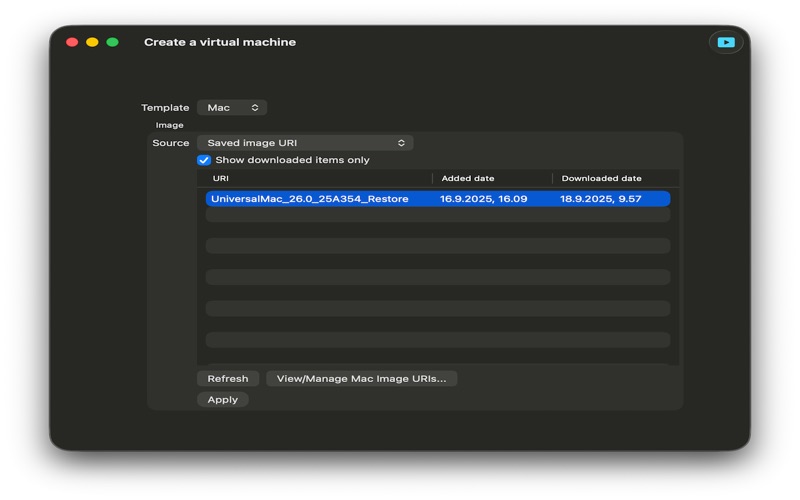
For creating mac virtual machines, app provides a range of restore image URI options to choose.

For creating Linux virtual machines, app accepts only a downloaded restore image.

What is special with this app?

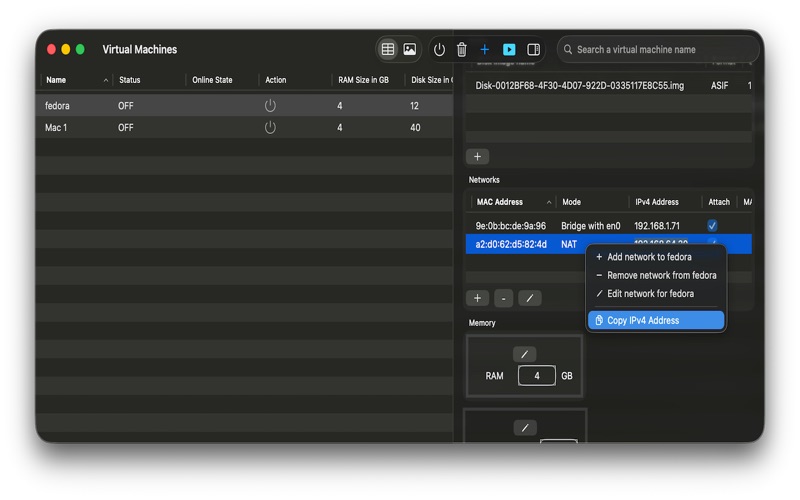
The app provides a Table view of virtual machines to sort virtual machines by name, status, RAM size, Disk size, disk format, number of cores, MAC address, and creation date. The table also shows OS installation status.

A virtual machine's window can be closed even when it is running. When needed, the virtual machine window can be seen by double clicking on the virtual machine's name on the main window.

For Linux virtual machines, disk is optional. In case you want to test a Live ISO, you do not have to check how much space is left on the host machine to be allocated for the virtual machine. You can just remove the disk configuration from the "Create a virtual machine" window and proceed.

Disks can be added/included/excluded later in the inspector pane.

With Virtual Machines House version 1.5.0, a user does not have to login to a virtual machine's window just for finding the IP address. Instead, user can find the IP address of the virtual machine from the network configuration table in the inspector pane. After starting a virtual machine, the IPv4 address(es) of the virtual machine will be shown as soon as the operating system of the virtual machine sets up the network interfaces. This is very useful for doing ssh when starting a virtual machine in different Wi-Fi environments with dynamic network configuration.