Fill Safari web forms directly from an MSR90 magnetic stripe reader—without retyping card data
Fill Safari web forms directly from an MSR90 magnetic stripe reader—without retyping card data.

Built for authorized membership, loyalty, access-control, attendance, and data-entry workflows. MSR90 Card Reader captures up to three tracks, extracts only the fields you choose, and inserts them into the focused field on the current webpage.

WORK FASTER IN SAFARI

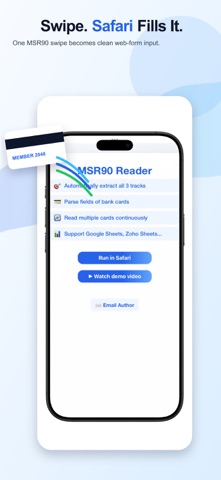
• Autofill web forms
Insert structured card data into text fields, spreadsheets, CRMs, registration pages, and other browser-based tools.

• Capture all three tracks
Read Track 1, Track 2, and Track 3 from MSR90 and compatible keyboard-emulation readers.

• Choose the fields you need
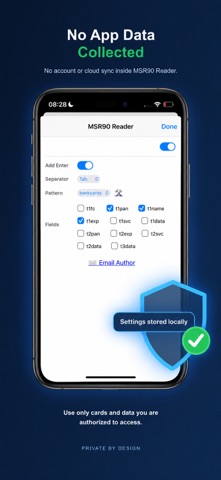
Select supported fields such as member name, identifier, expiration date, service code, or raw track data.

• Scan continuously
Process multiple authorized cards in sequence and automatically move to the next field or row.

• Control the output
Use Tab, Enter, or Space as a separator and optionally send Enter after every swipe.

• Match custom card formats
Create reusable JSON and regular-expression patterns for proprietary membership, loyalty, identification, and access-control systems.

• Use a native Safari extension
Run on iPhone, iPad, or Mac without installing additional desktop software.

• Private by design
No account, analytics, or cloud sync. MSR90 Card Reader does not collect app data.

IDEAL FOR

• Membership and loyalty enrollment
• School, clinic, gym, and event attendance
• Authorized access-card data entry
• Spreadsheet and CRM workflows
• Repetitive browser-form entry

HOW IT WORKS

1. Connect a compatible MSR90 keyboard-emulation reader.
2. Enable MSR90 Card Reader in Safari Extensions.
3. Focus the destination field on a webpage.
4. Swipe an authorized card.
5. The selected fields are parsed and inserted automatically.

COMPATIBILITY

Designed for MSR90 and compatible magnetic stripe readers that operate as keyboard input devices. Hardware, connection adapters, card formats, and webpage behavior may vary.

RESPONSIBLE USE

Use MSR90 Card Reader only with cards and data you are authorized to access. The extension reads and formats data; it does not write or encode magnetic stripes. Information entered into a third-party website is subject to that website’s privacy practices.