The most popular UI wireframing tool — now on your Mac, no internet required.

MockFlow WireframePro for Mac is a powerful, fully offline design tool for planning user interfaces, writing product specs, and mapping workflows — all from your desktop.
No accounts, no cloud dependency, no distractions. Just open and design.

WIREFRAMING MADE FAST
Drag and drop from a rich library of UI components — buttons, forms, navbars, tabs, modals, and more. Arrange screens quickly and iterate without friction. Built for speed, not pixel-perfection.

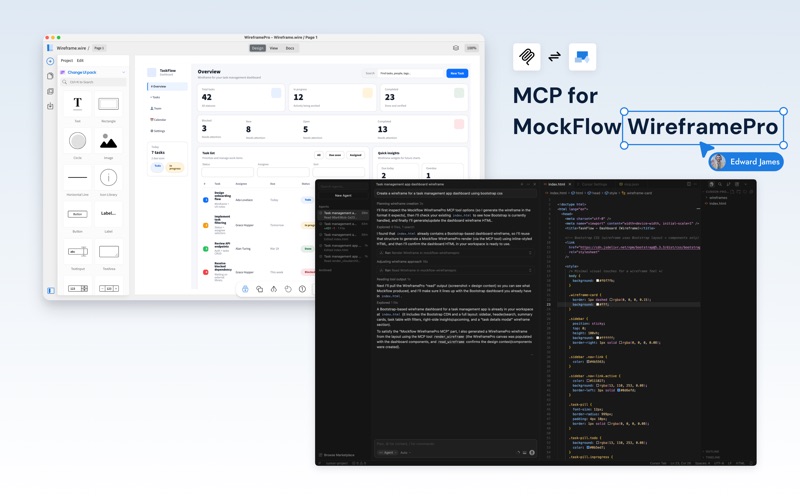
CONTEXTUAL AI WIREFRAMING WITH MCP
WireframePro includes a built-in MCP (Model Context Protocol) server — a connector that lets AI coding assistants contextually generate wireframes and  also convert wireframes to code.

Works with Claude Code, Cursor, VS Code Copilot, Codex, Windsurf, and any MCP-compatible AI agent:

- Describe a screen in plain English and AI contextually draws the wireframe on your canvas, adapting to your project's design patterns
- AI reads your existing wireframes and contextually converts them to production-ready code — React, Vue, Tailwind CSS, HTML, and more
- Two-way contextual workflow: design to code, or code to design — the AI understands what's on your canvas and builds on it
Add WireframePro as an MCP connector in one command and start prompting: "wireframe a dashboard with a sidebar, chart, and data table."

BEYOND BASIC COMPONENTS
Go further with charts, advanced data grids, tree views, and annotation components — the building blocks for dashboards, admin panels, and data-heavy interfaces.

FIGMA EXPORT
Bridge wireframing and high-fidelity design. Export your wireframes to Figma via the free MockFlow Figma plugin — elements convert to native, editable Figma layers with styling, fonts, and hierarchy preserved. Wireframe fast in MockFlow, refine in Figma.

DOC MODE
Write PRDs, design specs, and feature documentation alongside your wireframes. Keep decisions and designs in one place instead of scattered across tools.

FLOW MODE
Map user flows, process diagrams, and navigation structures without leaving the app. Connect screens and logic visually.

FILE-BASED & PORTABLE
Projects save as .wire files. Back them up to any cloud drive, commit them to your Git repo alongside code, or share them directly. Your work stays yours.

BUILT-IN REVISION HISTORY
Every project tracks revisions automatically — no server required. All history lives inside the .wire file itself, so you never lose past iterations.

EXPORT OPTIONS
Export screens to retina-ready PNG or PDF for presentations, handoffs, and documentation. Also as interactive PDF that saves interactions of the wireframe inside the PDF.

100% OFFLINE
Works without internet — ideal for air-gapped environments, travel, focused deep work, or any situation where you want to design without connectivity.

BUILT FOR
- Designers exploring layouts and early concepts
- Product managers defining user flows and writing specs
- Developers clarifying UI before writing code
- Teams that need a portable, offline-first wireframing tool

A note on the offline edition: This version is designed for self-contained, offline work. It does not include the cloud icon/shape/illustration libraries, real-time collaboration, meetings, or template marketplace available in the online version. What it does include is everything you need to wireframe, document, and export — fast.