PaletteFrame finds the color language of videos and still images—then turns it into something you can inspect, share, and use
PaletteFrame finds the color language of videos and still images—then turns it into something you can inspect, share, and use.

Drop in a source and the app begins analyzing on your Mac. Choose 5, 7, 10, or 12 dominant colors, select an analysis depth, and decide whether your hero frame should be the sharpest candidate, the frame that best represents the overall palette, or one you choose manually.

PERCEPTUAL COLOR ANALYSIS

PaletteFrame groups sampled colors in OKLab, a perceptual color space designed so numeric distance better follows visual difference. The deterministic pipeline normalizes output to sRGB, removes near-duplicate colors, sorts by dominance, and excludes a 5% border region to reduce letterbox influence.

COLOR STORY

For videos, PaletteFrame builds a time-segmented Color Story during the same streaming analysis pass. Higher analysis depths create progressively denser timelines, culminating in Exhaustive. Select a segment to inspect its representative frame and local palette. Set a start and end point when you want to reanalyze a specific excerpt, then export the complete timeline or an edge-to-edge color-bar-only PNG.

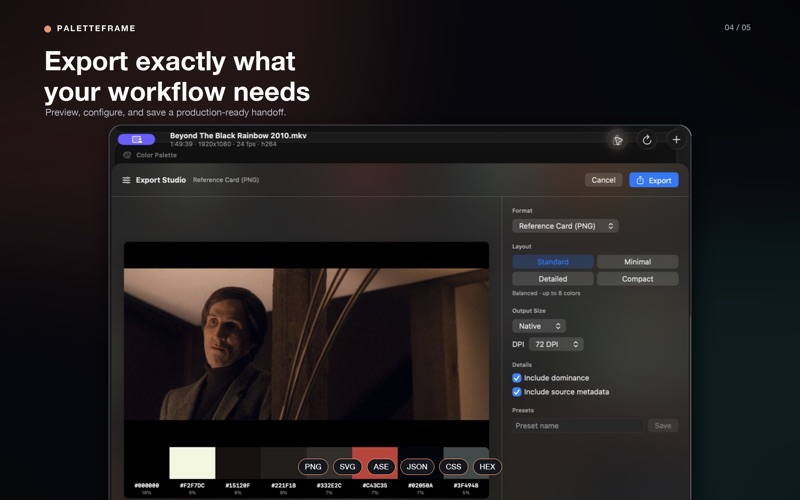
EXPORT STUDIO

Preview and configure the handoff before saving:

• Reference card PNG with hero frame, swatches, hex codes, and optional dominance
• Palette strip as PNG or SVG
• Adobe Swatch Exchange (ASE) for Adobe creative apps
• JSON with sRGB and OKLab values
• CSS custom properties
• Plain-text hex list
• Color Story timeline or color-bar-only PNG

Choose native, HD, 2K, 4K, or a custom output width where the format supports dimensions. Raster exports support 72, 144, or 300 DPI metadata. Save reusable Export Studio presets for repeatable delivery.

BROAD SOURCE SUPPORT

Video containers:
• MP4, MOV, M4V, MKV, AVI, WebM
• MPG, MPEG, FLV, WMV

Common codecs include H.264, H.265/HEVC, ProRes, VP8, VP9, AV1, MPEG-4, and Motion JPEG. PaletteFrame uses AVFoundation and VideoToolbox first, then retries with its bundled FFmpeg runtime when the system decoder cannot return frames.

Still images include JPEG, PNG, HEIC/HEIF, TIFF, WebP, GIF, BMP, and other formats readable by macOS ImageIO.

FOUR ANALYSIS DEPTHS

Fast, Standard, Deep, and Exhaustive modes let you choose the balance between turnaround and sampling density. Analysis streams frames in bounded batches and keeps heavy work off the main actor so the interface remains responsive.

PRIVATE BY DESIGN

Media decoding, pixel sampling, color analysis, and export happen on your Mac. PaletteFrame does not upload your source media or sampled colors.

Requires macOS 26 or later and an Apple Silicon Mac.