Process your entire video library in seconds with the ultimate private batch processing toolbox
Process your entire video library in seconds with the ultimate private batch processing toolbox.

Offline Video Converter is the all-in-one solution for content creators and pros who value speed, privacy, and offline reliability. Whether you need to compress 4K footage, turn a funny clip into a GIF, merge your vacation memories, or extract audio from 50 videos at once, our powerful Batch Engine handles it all in a single tap.

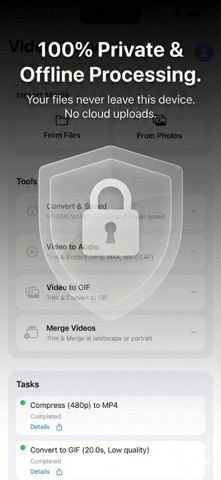
100% PRIVATE AND OFFLINE
Your videos never leave your phone. Unlike other apps that upload your files to the cloud, Offline Video Converter performs all conversions locally on your device.
• No Internet Required: Works perfectly in Airplane mode.
• Zero Tracking: No accounts, no logins, no data collection.
• Secure: Your personal memories stay in your hands.

POWERFUL BATCH PROCESSING
Why edit one by one? Select unlimited videos and apply edits globally:
• Batch Convert and Compress: Resize and format multiple videos instantly.
• Batch Merge: Join multiple clips into a single seamless video.
• Batch GIF Maker: Create high-quality animated GIFs from your videos.
• Batch Audio: Extract MP3, WAV, or M4A from a list of videos.
• Batch Speed: Create timelapses or slow-motion effects for the entire queue.

KEY FEATURES
1. Video Converter and Compressor (Highlight)
• Save Memory: Reduce file size by up to 80% without visible quality loss.
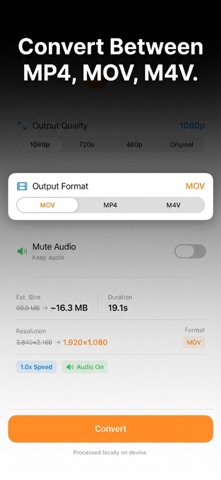
• Format Control: Convert videos to popular formats (MP4, MOV) for easy sharing.
• Bulk Resize: Batch convert 4K videos to 1080p, 720p, or 480p to free up iPhone storage space.

2. Audio Management and Extraction
• Audio Control: Choose to Mute video sound (remove background noise) or Keep the original audio track during conversion.
• Extract Audio: Turn video files into high-fidelity audio files (MP3, M4A, WAV, CAF).
• Pro Settings: Customize Sample Rate (44.1kHz, 48kHz) and Channels (Mono/Stereo).

3. Video Merger
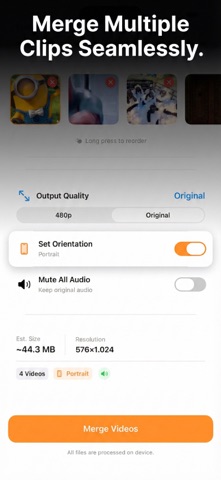
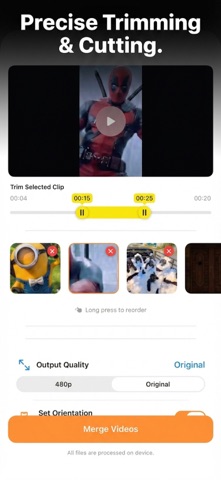
• Combine multiple clips into one seamless movie.
• Orientation Control: Choose between Landscape or Portrait merging.
• Batch Processing: Add as many clips as you need.

4. Precision Speed Control
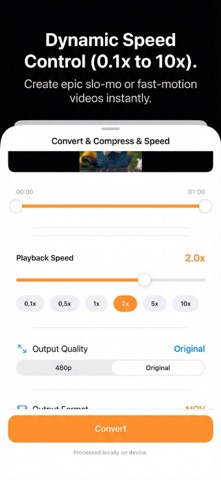
• Slo-Mo & Fast Motion: Adjust playback speed dynamically from 0.1x up to 10x.
• Two-in-One: Change speed and compress file size in a single step.
• Smart Safety: Built-in protection prevents you from making videos too short to export.

5. High-Quality GIF Maker
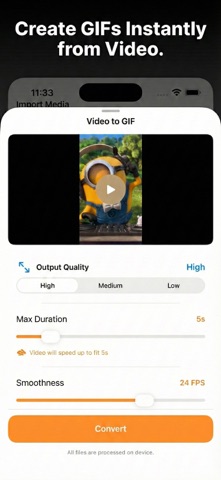
• Turn any video into a smooth, high-quality GIF.
• Custom Control: Adjust FPS and duration limits to create the perfect file size for social media sharing.

6. Precise Video Trimming
• Cut and Edit: Easily remove unwanted parts from the beginning or end of your clips before processing.
• Batch Trim: Apply unique trim ranges to each video in your queue, then process them all at once.

7. Optimized for iPhone & iPad
• Full-Screen iPad Experience: Utilize the full display for precise editing.
• Background Processing: Queue up multiple tasks and let them run.
• Clean Design: Intuitive interface designed for efficiency.

Download Offline Video Converter now and experience the fastest, safest way to manage your video library!

[About Version Premium]
• Payment will be charged to iTunes Account at confirmation of purchase
• Subscription automatically renews unless auto-renew is turned off at least 24 hours before the end of the current period
• The account will be charged for renewal within 24 hours before the end of the current period
• Any unused portion of a free trial period, if offered, will be forfeited when the user purchases a subscription
• Subscriptions may be managed by the user, and auto-renewal may be turned off by going to iTunes Subscriptions after purchase

Terms of Use: https://duongvu.page.link/VideoConverter_TermsOfService
Privacy Policy: https://duongvu.page.link/VideoConverter_PrivacyPolicy