


Description
ioshot is a lightweight, powerful screen capture, recording, and annotation utility for macOS
ioshot is a lightweight, powerful screen capture, recording, and annotation utility for macOS. Capture any region, record video or GIF, annotate with pro tools, extract text via OCR, and even evaluate math expressions on screen. Perfect for docs, tutorials, bug reports, and everyday sharing.


CAPTURE MODES

- Full Screen: Capture your entire display with one click
- Region Selection: Drag to capture any area with pixel-perfect precision
- Window Capture: Click any window to capture it instantly
- Multi-Display Picker: Live thumbnails of every connected display


SCREEN RECORDING

- Record fullscreen, region, or a specific window
- Save as MP4 (H.264), MOV (HEVC), or animated GIF
- Configurable frame rate (15 / 30 / 60 FPS)
- GIF resolution (480 / 640 / 1080 / Original) and FPS (10 / 15 / 24)
- Capture system audio, microphone, or both
- Independent cursor visibility setting for recordings


OCR & SMART TEXT

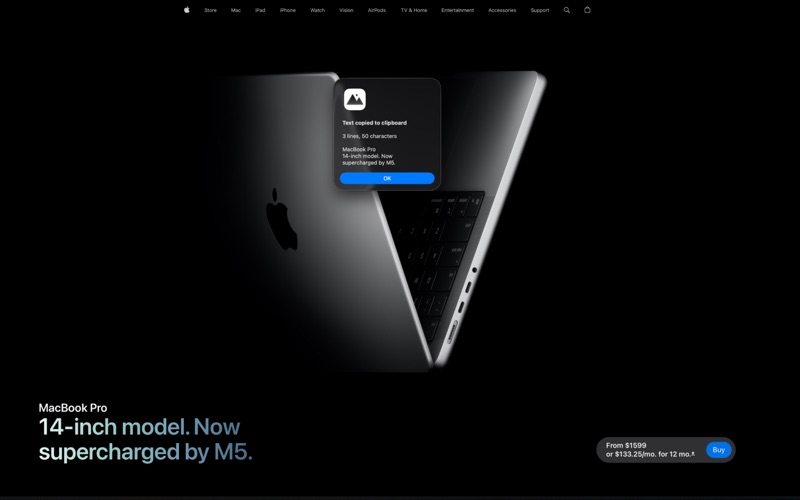
- Text Capture (OCR): drag to select an area, recognized text is copied to your clipboard
- Calculation OCR: capture a math expression and ioshot evaluates it and copies the result (e.g. `5/10` → `0.5`)
- Configurable decimal places and rounding mode for calculation results
- 10 OCR languages: English, Korean, Japanese, Chinese (Simplified & Traditional), German, French, Spanish, Italian, Portuguese


ANNOTATION TOOLS

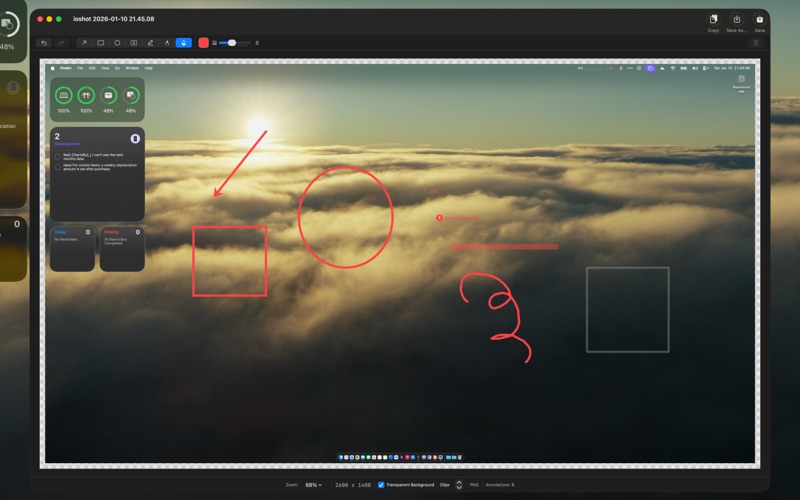
A built-in editor with professional annotation capabilities:
- Arrow / Line: independently toggle start and end caps (arrow, circle, bar, or none)
- Rectangle & Oval: outline or fill with color
- Pen: freehand drawing for signatures and marks
- Highlighter: semi-transparent marking with its own stroke width
- Pixelate (Mosaic): hide sensitive information with a true pixelate effect
- Text: rich text with bold, italic, underline, and strikethrough (⌘B / ⌘I / ⌘U / ⌘⇧X) — edit directly on canvas
- Number Badges: independent annotation type with editable numbers and adjustable size
- Crop: rule-of-thirds overlay, Enter to apply / Esc to cancel — annotations reflow automatically


EDITING POWER-USER FEATURES

- Resize handles on every annotation (arrows get dedicated start/end handles)
- Mini context toolbar above selected annotations for quick color, number badge, delete
- Shift-drag to constrain: 45° arrows, squares, circles, axis-locked moves
- Option-click to duplicate; Option mid-drag keeps the original in place
- Cmd+C / Cmd+V to copy and paste annotations
- Undo / Redo, even while editing text
- Click the title in the toolbar to rename your capture before saving
- Pin the editor window to stay on top of other windows
- Quick share via AirDrop, Messages, Mail, and more


SMART FEATURES

- Global Hotkeys: capture and record from anywhere with customizable shortcuts (defaults ⌘⇧3–⌘⇧0)
- Customizable annotation tool shortcuts (single-key, no modifier needed)
- Multi-Monitor Support: works seamlessly across all connected displays
- Retina Support: high-resolution captures at native display quality
- Transparent Padding: add professional margins around your screenshots
- Independent cursor settings for capture vs. recording
- Auto-sized stroke width and text size based on capture resolution
- Multiple image formats: PNG, JPG, TIFF, GIF
- Instant Clipboard: copy captures directly for quick sharing
- Thumbnail preview after each capture
- History view with grid browser, batch copy / share / delete, and search
- User-chosen save location (configured on first launch, security-scoped)
- Launch at Login: always ready when you need it


WORKFLOW OPTIONS

After capture, choose to:
- Open in Editor for annotations
- Copy directly to clipboard
- Save to your preferred location


MULTILINGUAL APP UI

ioshot's interface is available in:
- English, Korean (한국어), Japanese (日本語), Chinese Simplified (简体中文), Spanish (Español)
- Switch languages instantly in Settings without restarting

ioshot lives in your menu bar, ready to capture at a moment's notice without cluttering your Dock.
Category: Productivity(96543)
Version: 1.11.1
BundleId: com.croatoan.ioshot
Developer: Joonhee Cho
Updated: 2026-05-29
