Know whether your internet connection is ready—and where to look when it is not.

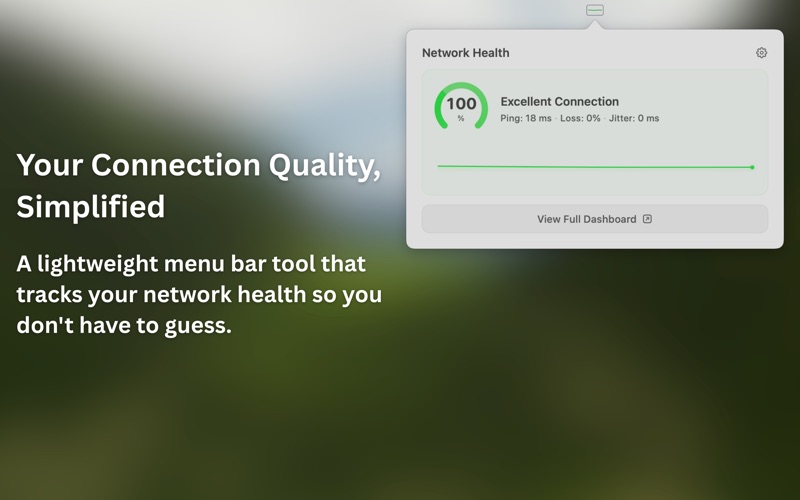
Healthy Network is a native Mac menu bar app that turns latency, jitter, and packet loss into a clear connection-quality signal. Check readiness before a call, follow guided diagnostics when something feels wrong, and save evidence for your ISP or support team.

KNOW BEFORE THE CALL

• See a live connection-quality score from the menu bar
• Check suitability for video calls, gaming, and browsing
• Watch latency, jitter, packet loss, uptime, and recent history
• Use a compact panel for a fast “Am I good?” answer

FIND WHERE TROUBLE STARTS

• Compare Mac, router, ISP, and internet evidence in Connection Path
• Check gateway and destination latency with Route Diagnostics
• Follow plain-language diagnoses and practical next steps
• Recognize local Wi-Fi trouble versus upstream instability

TEST AND DOCUMENT

• Run on-demand download and upload checks
• Measure loaded latency and see a bufferbloat severity rating
• Generate a plain-language diagnostic report
• Copy or save evidence for support tickets and incident notes

BUILT FOR MAC

• Native Swift and SwiftUI interface
• Optional always-on-top mini HUD
• Launch at login
• Apple Silicon and Intel support
• macOS 13 Ventura or later

PRIVACY

Monitoring history stays on your Mac. Healthy Network contains no advertising trackers. The Mac app sends privacy-scrubbed crash data and operational diagnostics to Sentry to improve reliability; this telemetry is not used for advertising or cross-app tracking.

Measurements are best-effort estimates of general connectivity. VPNs, privacy tools, and network configuration can limit diagnostic visibility, and a result does not guarantee the behavior of a specific calling, gaming, or streaming service.