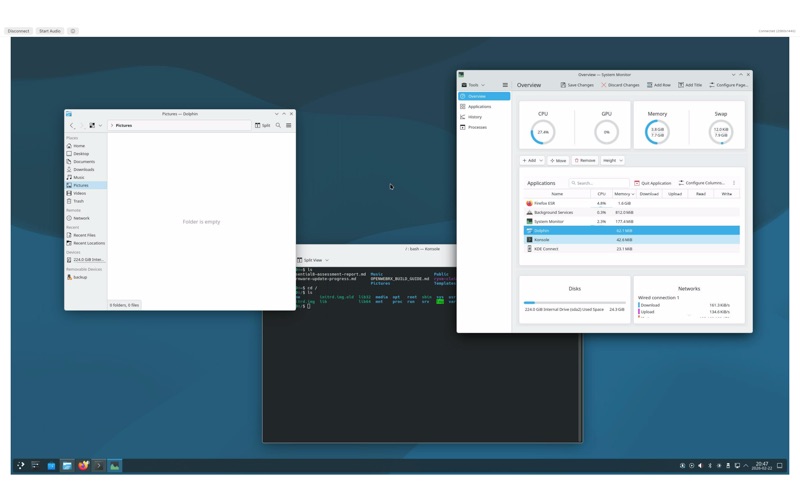
A fast, native macOS client for managing KVM-over-IP switches directly from your Mac
A fast, native macOS client for managing KVM-over-IP switches directly from your Mac.
SwiftKVM lets you remotely access and control servers, workstations, and network equipment connected to KVM-over-IP switches — all from a lightweight native app built specifically for macOS.

Full Remote Desktop Access

View your remote system's display in real-time with high-performance video streaming. SwiftKVM supports resolutions up to 4K (3840x2160) with multiple encoding modes including ICT 4K YCbCr, Hextile, and Raw, automatically selecting the best path for your connection. Send keyboard and mouse input directly to the remote system with low latency.

Remote Audio Streaming
Listen to audio from your remote system with one click. SwiftKVM streams PCM audio over a dedicated connection, supporting stereo playback at up to 48 kHz with 16-bit depth. Start and stop audio with a single button.

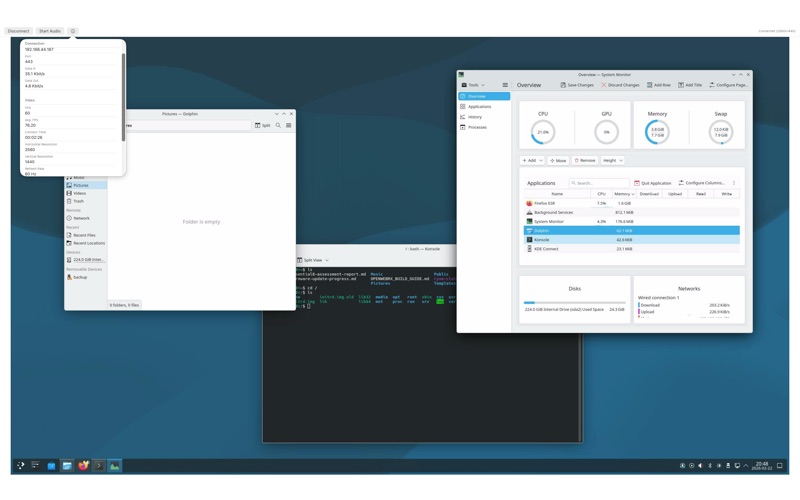
Live Diagnostics
Monitor your connection in real-time with the built-in diagnostics panel. View data throughput, frame rate, video resolution, refresh rate, audio format, and device information — all updating live.

Saved Connection Profiles
Save frequently used connections as profiles for one-click access. Credentials are stored securely in the macOS Keychain, never in plain text.

Built for macOS
SwiftKVM is a true native macOS application — not a Java applet, not a browser plugin, not an Electron wrapper. It uses Metal for GPU-accelerated video rendering, AVFoundation for audio playback, and Network.framework for TLS connections. The result is minimal CPU usage, instant launch times, and seamless integration with macOS features like window management and keyboard shortcuts.

IPv4 and IPv6 Support
Connect to devices on any network. SwiftKVM supports both IPv4 and IPv6 addressing, including link-local addresses with zone identifiers.

Compatibility
SwiftKVM is compatible with Raritan Dominion KX series KVM-over-IP switches. It communicates using the e-RIC protocol over TLS-encrypted connections on port 443.

Privacy
SwiftKVM connects directly to your KVM device. No data is sent to third-party servers. No analytics. No telemetry. Your connection credentials are stored in the macOS Keychain and never leave your machine.

---
SwiftKVM is independently developed and is not affiliated with, endorsed by, or sponsored by Raritan, Legrand, or any of their subsidiaries. Raritan and Dominion are trademarks of Legrand. All other trademarks are the property of their respective owners.