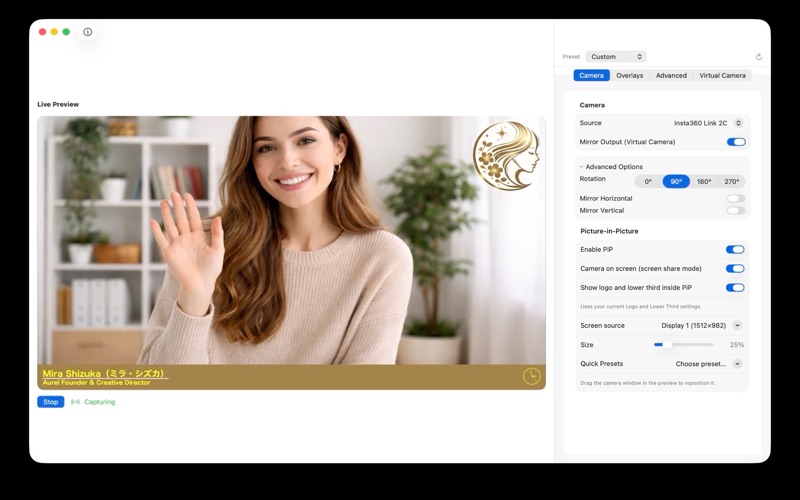
BroadcastCamPlus turns your Mac's webcam into a professional broadcast camera. Add your company logo, name and title, scrolling announcements and a clock, then use it in any video app such as Zoom, Google Meet, Microsoft Teams or OBS.

EASY SETUP
- Install the app
- Enable the camera extension in System Settings
- Select "BroadcastCamPlus" as your camera in the video app
- Done: your overlays appear automatically

PIP (PICTURE-IN-PICTURE)
- Combine webcam and screen capture in one virtual camera feed
- Place your camera as an overlay while sharing your desktop
- Keep logos, lower thirds, rolling text and clock visible in PiP
- Ideal for webinars, tutorials and live presentations

LOGO
- Add your company or personal logo
- Choose from 6 positions: corners or banner style
- Adjust opacity and size
- Save multiple logos in the library

LOWER THIRD
- Display your name and title professionally
- Customise font, colours and alignment
- Automatically adapts to the available space
- Perfect for webinars and presentations

ROLLING TEXT
- Add announcements or messages
- Direction from left to right or vice versa
- Adjustable speed and style
- Ideal for event or social media info

CLOCK
- Digital or analogue style
- 12 or 24 hour format
- Optional time zone
- Always keep track of time during long meetings

BACKGROUND
- Blur your background for more privacy
- Replace your background with custom images
- Keep the focus on you

CAMERA CONTROLS
- Rotate your video (0 deg, 90 deg, 180 deg, 270 deg)
- Flip horizontally or vertically
- Works with any USB or built-in camera

PRESETS
- Switch between configurations instantly
- Logo Only, Lower Third, Meeting, or Custom
- Quick change with shortcut (Option + Space)

PRIVACY
- No internet connection required
- No data collection
- Everything stays on your Mac

Works with Zoom, Google Meet, Microsoft Teams, FaceTime, OBS, Webex, and any app that uses your camera.

Requires macOS 12.3 or later.