SubVision — Extract Hardcoded Subtitles on macOS
Turn burned-in subtitles into editable, time-coded SRT files in minutes
SubVision — Extract Hardcoded Subtitles on macOS
Turn burned-in subtitles into editable, time-coded SRT files in minutes.
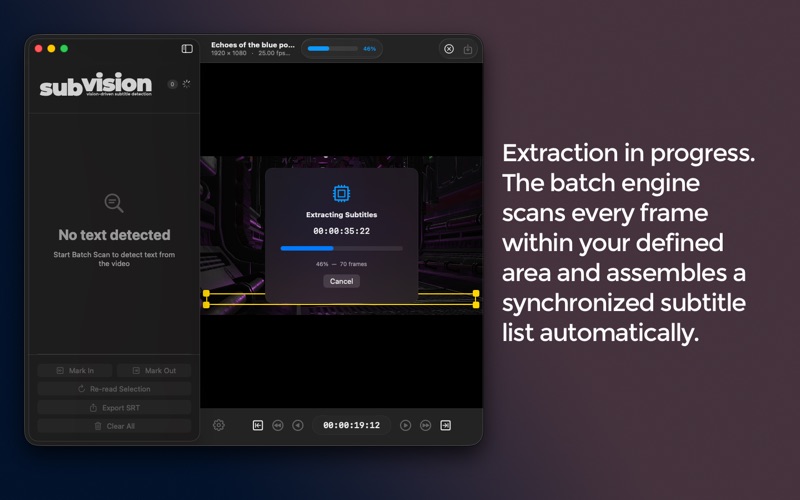
SubVision is a professional macOS tool that extracts hardcoded subtitles from video files using OCR and converts them into clean, editable SRT files — automatically.
If you work with archival footage, foreign language content, or any video where subtitles are embedded in the image, SubVision eliminates the need for manual transcription. Load your video, define the scan area, and let the OCR engine do the rest.
Universal OCR Engine
Powered by Apple Vision, SubVision automatically detects and adapts to different languages and scripts — including Latin, Cyrillic, and more — without requiring manual configuration.
Precise Control Over Extraction
Region of Interest (ROI)
Define exactly where SubVision looks for text by adjusting the overlay directly on the video. This reduces false positives and improves both speed and accuracy.
Scan Range
Set IN and OUT points to process only a specific portion of your video.
OCR Engine Tuning
Adjust presets and filters to improve detection on challenging footage, including low contrast or degraded sources.
Review and Refine
All detected subtitles are displayed with timecodes in an interactive list.
Edit text, adjust timing frame-by-frame, or use “Re-read Selection” to re-scan a single subtitle without reprocessing the entire video.
Export
Export standard SRT files compatible with Final Cut Pro, Premiere Pro, DaVinci Resolve, VLC, YouTube, and other professional tools.
Designed for macOS
• Native video playback with frame-accurate control
• Keyboard shortcuts for fast navigation and editing
• Clean, focused interface
• Fully offline — no data is collected or transmitted
Quick Start
• Import your video file
• Define the subtitle area (ROI)
• Click “Start Scan” to begin extraction