ClipSpin is a fast, minimal clipboard manager that lives in your menu bar. It remembers the last 1,000 things you copy and lets you access them instantly through a visual radial wheel or a clean dropdown menu.

**Clipboard Wheel**
Press ⌘⇧V to open the wheel — a quick, visual way to pick from your 10 most recent items. Hover or step through them, then release to paste. No scrolling, no searching, just pick and go.

**Smart Snippets**
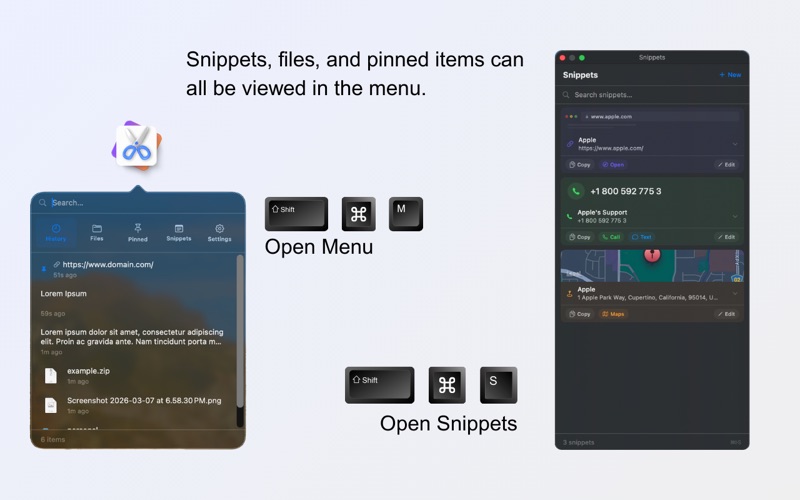
Save reusable pieces of information — emails, addresses, phone numbers, URLs, nameservers, and custom multi-field entries. Each snippet type has structured fields and contextual quick actions:

- Email snippets let you compose and send with one click
- Address snippets open directly in Apple Maps
- Phone snippets let you call or message instantly
- Multi-field snippets auto-fill forms field by field

Click any snippet to expand it and copy individual fields. Press ⌘⇧S to open the dedicated Snippets side panel from anywhere.

**Pin What Matters**
Pin up to 5 frequently used items so they always appear at the top of your wheel and history. Pin the last thing you copied with ⌘⇧P.

**Full Content Support**
Text, URLs, images, files, folders, and archives — ClipSpin handles them all. Files show real icons and metadata. Images are stored up to 2 MB.

**Customisable Shortcuts**
Four global shortcuts for the wheel, menu, pin, and snippets — all fully customisable from Settings. ClipSpin warns you if a shortcut conflicts with another app.

**Private by Design**
ClipSpin is 100% local. No network access, no analytics, no cloud sync. Your data is stored in a JSON file on your Mac and never leaves it.