CueScribe turns recordings into transcripts that know who spoke when, entirely on your iPhone
CueScribe turns recordings into transcripts that know who spoke when, entirely on your iPhone.

Record a conversation in the app, or import audio from Voice Memos, Files, or any other app. CueScribe transcribes them locally, separates the voices, and lets you name each speaker. The result lands in a library you can search, tag, and share. No cloud servers, no audio uploads, no accounts.

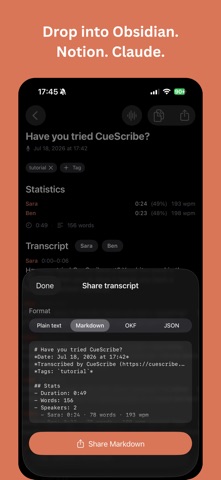
Export to plain text, Markdown, JSON, or OKF and drop a transcript into Obsidian, Notion, an AI tool like Claude, or wherever you keep your notes. CueScribe captures the words. Your tools do the thinking and the linking.

WHAT YOU CAN DO WITH CUESCRIBE
• Interviews. Journalists, researchers, and oral historians get speaker-labeled transcripts of long-form conversations.
• Meetings and One-on-Ones. Drop a recording in after a call, get a transcript with named participants, and tag it by project for later.
• Lectures and study notes. Record a class and search the transcript by keyword when you need to find a specific point.
• Podcasts and content. Capture an episode and walk away with a transcript ready for show notes, blog posts, or quote pull-outs.
• Therapy, coaching, and legal work. Privacy-sensitive professions get accurate transcripts without their clients' audio touching an online service.
• Field research and site visits. Record observations on the go and tag them by site or subject so they're easy to find later.
• Voice journaling. Capture a thought as audio, read it back as text, and search across months of entries.

WHY CUESCRIBE
• Knows who said what. Every transcript is automatically split into speaker turns. Tap a speaker to give them a name (Sarah, Client, Interviewer), and these flow through every export format, much needed context for your AI tooling. Name a speaker once and CueScribe recognizes their voice in future recordings, naming them automatically.
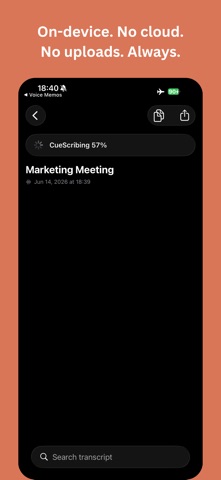
• Everything runs on-device. Both transcription and speaker identification happen on your iPhone using state-of-the-art speech processing. Your audio is never processed online, and the source audio can be deleted after processing.
• Capture on Apple Watch. Record from your wrist and recordings sync to your iPhone to transcribe automatically.
• Share audio from Voice Memos (or any app that exports audio) and CueScribe opens and starts transcribing.
• Speaks your variant. 17 regional variants across 6 languages, so the transcriber is tuned to the accent in your recording.
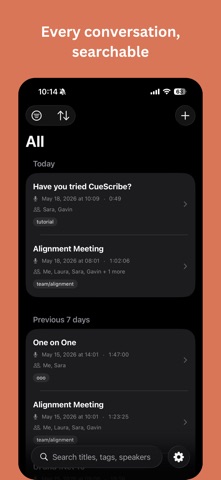
• Your library, organized. Tag transcripts. Filter by All, Recent, Untagged, or your tags. Search by title, tag or speaker. Sort by recorded date, transcribed date, or title.
• Share in the format you need. One-tap copy as plain text, or export as plain text, Markdown, JSON, or OKF, depending on your destination. Speaker names are baked into every format.
• Automate with Shortcuts. Export transcripts from the Shortcuts app to slot CueScribe into your workflows.
• Syncs across your devices. Optional iCloud sync keeps transcripts in step on iPhone and iPad via your private iCloud database. Audio never syncs, but is backed by your iCloud Device Backup.

LANGUAGES
CueScribe transcribes audio in 17 regional variants across 6 languages. Pick one variant per recording, matched to the speaker's accent, for best accuracy. Every variant runs fully on-device.
• English: United States, United Kingdom, Australia, Canada, India, Ireland, New Zealand, Singapore, South Africa
• Spanish: Spain, Mexico
• French: France, Canada
• German: Germany
• Italian: Italy
• Portuguese: Brazil, Portugal

PRIVACY
No online processing, no tracking, no analytics, and no sign-in. Transcription and speaker identification run on-device, and the source audio can be deleted after processing. If you enable iCloud Sync, only text (transcripts, statistics, tags, speaker names, etc.) syncs through your own private Apple iCloud.