Film your family without sharing their faces. Unblur is the camera app for parents who don't want to post their kids online — every face in your videos and photos is blurred automatically, except yours.

Modern parents love capturing the small moments: the first steps, the messy kitchen dance, the birthday grin. But posting those moments has become impossibly loaded. Once a child's face is on the internet, it stays there — on servers you can't audit, in training sets you never consented to, in places you'll never get it back from. So more and more parents just stop sharing. Unblur gives you a different option.

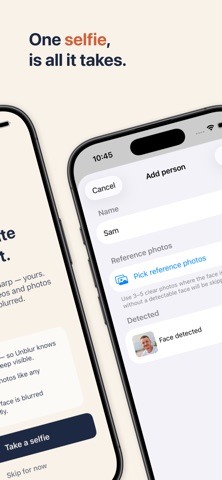
Enrol yourself with a single selfie. Then every video you film and every photo you take keeps your face visible and automatically blurs every other face in the frame — including your own children's. The finished clip saves straight to your Photos library, ready to share with the group chat, the grandparents, or anywhere you want, without ever exposing a kid's face.

HOW IT WORKS

1. Take one selfie — Unblur uses it to recognise your face. It never leaves your iPhone.
2. Open the camera — film video or take photos like you would in any camera app.
3. Only you stay sharp — every other face in the frame is blurred automatically, and the finished video is saved straight to your Photos library, ready to share.

FEATURES

• Real-time face detection and blur, on-device, as you record
• Full-resolution photo capture with the same automatic blur
• Live preview — see exactly what the video will look like while you're still filming
• Import existing photos and videos from your library and re-process them
• Interactive photo editor — tap individual faces to toggle blur on or off
• Flexible enrolment — default to just yourself, or add a partner or older child if you want them visible too
• Front and back camera with pinch-to-zoom
• Full audio recording with per-take mute
• Built-in library for your processed videos and photos

PRIVACY FIRST

Unblur runs entirely on your iPhone using Apple's built-in Vision framework. Nothing is uploaded. There is no account, no login, no cloud sync, no analytics, no advertising, and no tracking. Your face data stays on your device, encrypted by iOS.

Read the full privacy policy at tryunblur.com/privacy.html

WHO IT'S FOR

• Parents who don't want to post their kids' faces on social media
• Anti-sharenting families who still want to capture real moments
• Anyone who's tried to share a playground video and realised they can't

PRICING

Free to download and try. Pro unlock is a one-time purchase — no subscription, ever.

Questions, feedback, or support: [email protected]
Website: tryunblur.com