Tuck is the simplest way to track what you spend. Snap a photo of a receipt and Tuck instantly reads the merchant, total, and date — no typing required. Or add an expense by hand or by voice in seconds.

Built to be fast, private, and genuinely useful every day.

SNAP & GO
• Photograph a receipt and Tuck fills in the amount, merchant, and date automatically
• Save the receipt image so you always have a record
• Add expenses manually or by voice when you're on the move

SEE WHERE YOUR MONEY GOES
• Beautiful weekly, monthly, and yearly reports
• Category breakdowns with a clean spending donut
• Spot trends and your biggest categories at a glance

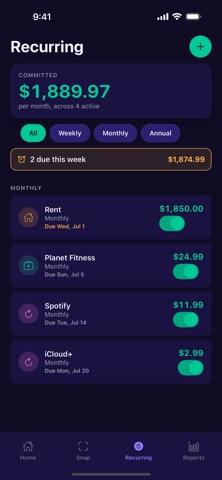
STAY AHEAD OF BILLS
• Track recurring subscriptions and bills in one place
• See what's due this week and log it with one tap
• Optional reminders so nothing slips through

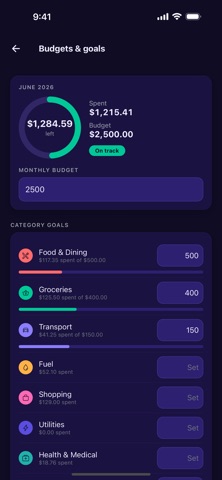
BUDGETS & GOALS (Tuck+)
• Set a monthly budget and per-category goals
• Watch a live progress ring on your home screen
• Know instantly whether you're on track or overspending

WORK EXPENSES (Tuck+)
• Tag expenses to a business or employer
• Generate a clean date-range expense report
• Email it as a PDF in one tap — perfect for reimbursements

FOR FAMILIES (Tuck Family)
• Add family members and track who spent what
• Everyone's spending, organized in one place

PRIVATE BY DESIGN
• Your expenses are stored on your device, not in an account
• No sign-up, no login, no selling your data
• Receipt photos are processed only to read the text, never sold

Tuck+ and Tuck Family are available as monthly or annual subscriptions. Manual expense entry, receipt scanning, categories, and reports are free to use.

Subscriptions auto-renew unless turned off at least 24 hours before the end of the current period. Payment is charged to your Apple Account. Manage or cancel in your App Store account settings.

Terms of Use (EULA): https://www.apple.com/legal/internet-services/itunes/dev/stdeula/
Privacy Policy: https://www.teqwiz.com/privacy/tuck

Snap it. Tuck it. Done.