Your Google Takeout export is a mess: cryptic filenames, broken dates, and thousands of scattered JSON files
Your Google Takeout export is a mess: cryptic filenames, broken dates, and thousands of scattered JSON files. Takeout Photo Organizer turns it back into a clean, beautiful photo library — in one click.

WHY YOU NEED IT
When you download your library from Google Photos, every photo loses what matters most. The real "date taken" is buried in a JSON sidecar file, locations are hidden, and nothing is sorted. Imported anywhere else, your memories show up as one giant undated pile.

WHAT IT DOES
• Reads your Takeout .zip directly — no manual unzipping, no setup
• Restores the true "date taken" to every photo — in the file's EXIF and in Finder
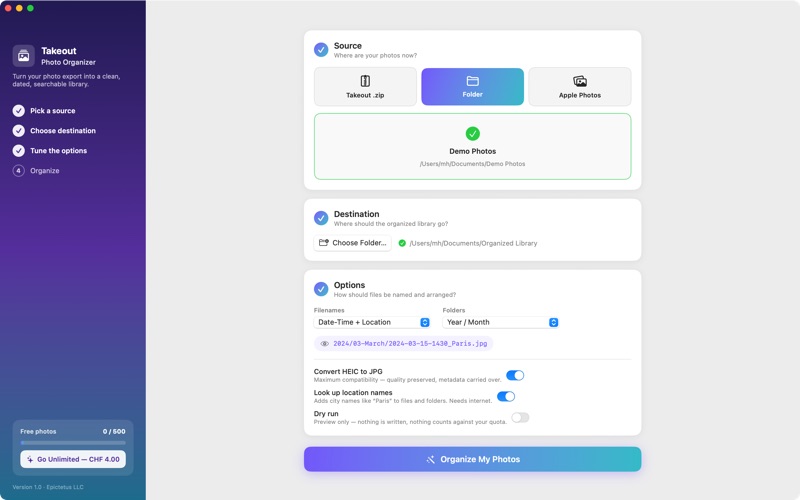
• Renames photos the way you want: 2024-03-15-1430_Paris.jpg
• Sorts everything into clean folders: by year, month, day, or place
• Converts HEIC to universally compatible JPG — quality and metadata preserved
• Adds real place names (Paris, Tokyo, Rome…) from your photos' GPS data
• Also organizes your Apple Photos library or any plain folder of pictures
• Organizes straight onto USB sticks and external drives — filenames stay safe on any filesystem, and free space is checked before anything is written
• Live preview shows exactly how files will be named before you commit
• Dry-run mode: see the full result without writing a single file

PERFECT FOR
• Leaving Google Photos and moving your library to your Mac
• Fixing wrong photo dates after a Google Takeout export
• Converting HEIC photos to JPG in bulk
• Backing up an organized photo archive to an external hard drive
• Merging years of exports into one tidy, chronological library

PRIVATE BY DESIGN
Everything happens on your Mac. Your photos are never uploaded, analyzed, or shared. No account, no tracking, no data collection — ever.

SIMPLE PRICING
Organize your first 500 photos completely free. One single purchase unlocks unlimited photos forever. No subscription, no recurring fees.

HOW IT WORKS
1. Drop in your Takeout .zip (or pick a folder / your Apple Photos library)
2. Choose where the organized library should go
3. Pick your naming style and folder structure
4. Press Organize — watch your library rebuild itself, photo by photo

Rescue your memories from the export graveyard. Your future self will thank you.