
Bagging: Receipts & Expenses
0.0 8.82MB 0 Free
Version 1.0.6
Updated 2026-07-30
Developer 1576136 B.C. Ltd.



Description
Keep every receipt, without the shoebox
Keep every receipt, without the shoebox.

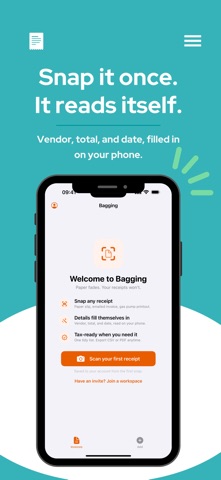
Bagging is a free, private receipt and invoice keeper for your iPhone. Snap a photo of any receipt or invoice and Bagging reads the vendor, the total, and the date for you, right there on your device. Glance at what it found, fix anything that looks off, and save. That's it. The paper can go in the recycling.

Still readable in year six.
Thermal receipts can fade within months, and the tax office can ask you to back up a claim years later. Bagging keeps the original photo and the details together, intact and exportable, for as long as it matters. When an audit, your accountant, or an expense report comes calling, you already have everything.

Built for real life, not bookkeeping homework.
Scan at the counter, or pull one in from your photo library. Bagging gives you a clean, dated list of everything you've saved, with a running total at the top, so you always know where you stand. Tap any entry to see the full photo, edit a detail, or delete it.

Sort it your way.
Add a tag as you save: a category, a job, or a client. Tags autocomplete, everyone in the workspace shares the same list, and one tap filters the month to just that tag.

Bring in the backlog.
Moving from another app, or sitting on a camera roll full of old receipts? Select up to 100 photos at once and Bagging reads them into one review list: confident reads pre-checked, unclear ones flagged, likely duplicates called out, each receipt filed under its printed date. Scanning a paper stack works too: each page becomes its own receipt.

Forward it in.
New: forward an emailed receipt, a bill, or a PDF to your personal Bagging address, and it arrives ready to confirm.

See where the money goes.
The Insights tab charts your spending by week, month, or year, with totals by tag and your top vendors, all built from the receipts you already saved.

Share the load.
Keep receipts in shared workspaces: one for the shop, one for the rental, one for home. Invite your partner, your bookkeeper, or your team with a simple code, and everyone sees the same tidy list. Separate businesses stay separate.

Ready when tax time or an expense report is.
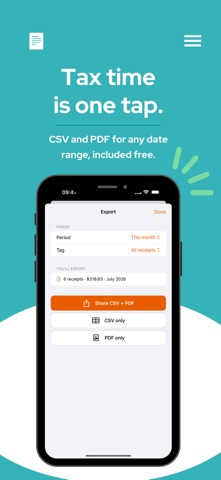
Choose a date range and Bagging hands you a tidy CSV spreadsheet and a printable PDF summary, complete with a grand total, straight to the share sheet to email, save to Files, or send to your accountant.

Private by design.
Your receipts are yours. Text recognition happens on your device. Your invoices and the details pulled from them are stored privately to your account and the workspaces you choose to share: never sold, never handed to advertisers, no ads. Any usage analytics are anonymous, never tied to you, and never include your receipts. Sign in with Apple or Google and skip the passwords.

WHAT YOU CAN DO
• Scan receipts and invoices with the built-in document scanner, or import from your photo library
• Let on-device text recognition fill in the vendor, total, and date automatically
• Review and correct the details on a quick confirm screen before saving
• Keep the original photo on every entry, and add a second photo when it takes two
• Browse a dated list with a running total, filtered by month, year, or any custom range
• Tag receipts by category, job, or client, filter by tag, and export with a Tags column in the CSV
• Import up to 100 receipt photos in one batch, with duplicates called out
• See spending charts by week, month, or year, with totals by tag and top vendors
• Share a workspace with your partner, bookkeeper, or team using a simple invite code
• Export any date range as a CSV spreadsheet and a PDF summary via the share sheet
• Sign in with Apple or Google, with no separate account or password to manage
• Amounts shown in Canadian dollars by default

A FEW HONEST NOTES
Bagging records the receipt as a whole (vendor, total, and date), not individual line items, and it doesn't connect to your bank or convert currencies. It's a simple, private keeper, on purpose. And it's free.
Category: Finance(50866)
Version: 1.0.6
BundleId: app.bagging.invoices
Developer: 1576136 B.C. Ltd.
Updated: 2026-07-30
