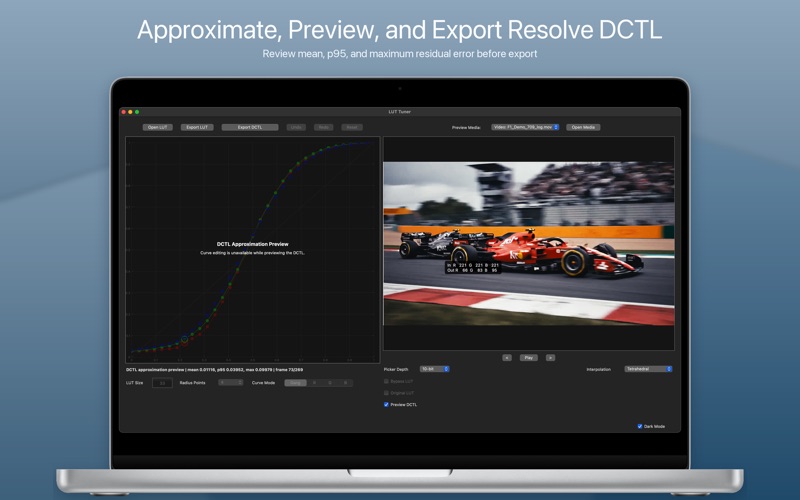
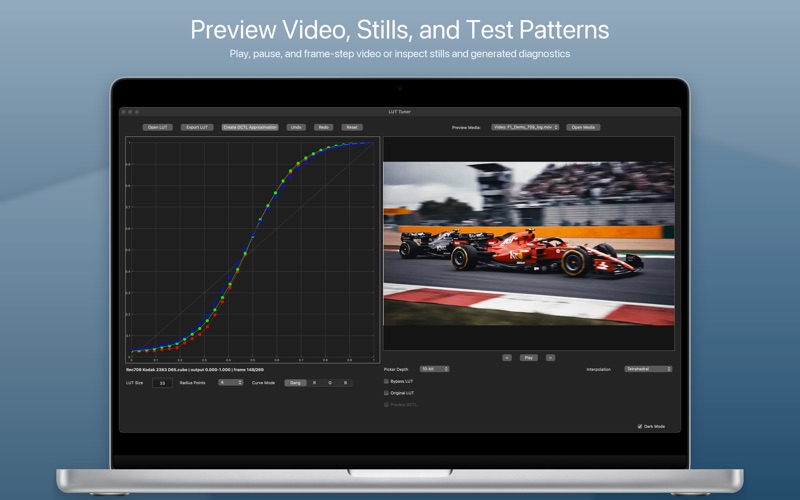
LUT Tuner directly edits the response curves inside a .cube 3D LUT, then creates a tunable DCTL approximation for DaVinci Resolve. Refine RGB channels individually or as a gang, evaluate the result against picture, and export the edited LUT, a Resolve DCTL, or both.

Unlike a bounded LUT that clips values outside its defined range, the exported DCTL can preserve extended-range image data. In Resolve, adjust tone and color strength, exposure, input contrast, contrast pivot, range handling, Invert, and Global Blend.

Preview the DCTL approximation on test patterns, stills, or video before export. LUT Tuner reports mean, p95, and maximum RMSE so colorists and finishing artists can evaluate the approximation quantitatively as well as visually.

-Key Features-
	•	Open and export standard .cube 3D LUTs
	•	Create forward DCTL approximations for DaVinci Resolve
	•	Preview the DCTL approximation on patterns, stills, or video before export
	•	Review mean, p95, and maximum RMSE fit metrics
	•	Define intended DCTL input and output color-space assumptions
	•	Tune tone, color strength, contrast, pivot, exposure, range handling, and blend in Resolve
	•	Invert the approximation when DCTL controls remain matched
	•	Direct RGB and ganged curve editing
	•	Still-image and video preview
	•	Original LUT comparison
	•	Bypass LUT preview
	•	Lasso selection and multi-point editing
	•	Radius-based neighboring point influence
	•	Keyboard nudging for precise adjustments
	•	Undo, redo, and reset
	•	LUT resize and resample
	•	Tetrahedral and trilinear interpolation
	•	Local processing on macOS

-Typical Workflow-
	1	Open a .cube LUT.
	2	Load a still image or video clip.
	3	Select or lasso curve points.
	4	Adjust RGB or ganged curves.
	5	Preview the result.
	6	Compare against the original LUT.
	7	Choose the intended LUT input and output assumptions, then create a DCTL approximation.
	8	Preview the DCTL and review mean, p95, and maximum RMSE.
	9	Export the updated .cube LUT, the Resolve DCTL, or both.


-Resolve DCTL Export-
LUT Tuner creates a forward DCTL approximation of the current edited LUT. Because it is an approximation rather than an embedded 3D LUT, the app reports mean, p95, and maximum RMSE and provides a live DCTL preview for evaluating the fit before export.

The exported DCTL includes tone and color-strength controls, input contrast and pivot, quarter-stop exposure control, Invert, Match LUT or Preserve Extended Range handling, and Resolve Global Blend.

-Inverse Workflow in Resolve-
To use the inverse workflow, apply two copies of the exported DCTL in consecutive Resolve nodes. Enable Invert on the first, upstream node and leave Invert disabled on the following, normal DCTL node. The upstream node removes the original/default transform before the downstream node reapplies the adjustable look.

Node order is essential. Do not place the Invert-enabled DCTL after the normal DCTL. The forward transform can compress or clip color information; once that information has been altered, the fitted inverse cannot reconstruct it accurately. Placing the Invert node first maintains the intended inverse-then-forward processing order.

For reliable pairing, keep exposure, input contrast, contrast pivot, tone strength, tone neutralization, and color-strength settings matched between both DCTL nodes—or leave them at their defaults.


-Media Support-
Preview generated patterns, still images, and supported video formats including .mov, .mp4, and .mxf. Common image formats include PNG, JPEG, TIFF, EXR, DPX, and HEIC.

-LUT Support-
Supports standard .cube 3D LUTs with LUT_3D_SIZE declarations, including identity, creative, display, and technical LUTs.
LUT Tuner is designed for focused .cube LUT editing—not as a full grading application or video editor.