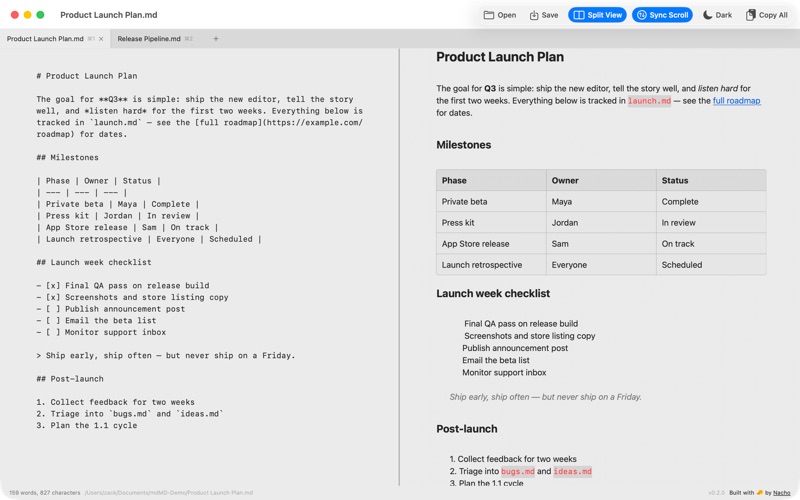
mdMD is a fast, native Markdown editor for macOS. More useful than a text editor, more lightweight than an IDE — open a .md file and it just reads beautifully.

WRITE, DON'T FIGHT
Your document renders as you type: headings, bold, lists, tables, and code blocks style themselves in real time. No split-brain preview pane required — though there's a synced split view when you want to see the raw Markdown too.

BUILT FOR SPEED
• Native app — instant launch, tiny footprint, no Electron
• Slash commands: type / for headings, lists, tables, code blocks, and more
• Keyboard-first: ⌘B bold, ⌘I italic, ⌘E inline code, ⌘K links
• Multi-tab editing with session restore

EVERYTHING MARKDOWN
• GitHub-flavored tables with live formatting
• Interactive task lists — click checkboxes right in the editor
• Mermaid diagrams render inline in code blocks
• Syntax-aware code blocks
• Front matter support

SHARE YOUR WORK
• Copy as rich HTML — paste into Notion, Google Docs, or email with formatting intact
• Opens .md, .markdown, .txt, and plain-text config files
• Round-trips file encodings safely (UTF-8, UTF-16, Latin-1)

AT HOME ON YOUR MAC
• Full light and dark mode
• Raw view, styled view, or side-by-side split with synced scrolling
• Drag and drop files to open
• Your last session restores exactly where you left off

No accounts. No subscription. No telemetry. Your files stay yours.