The official InnovRay macOS suite — one install, two apps, one account:
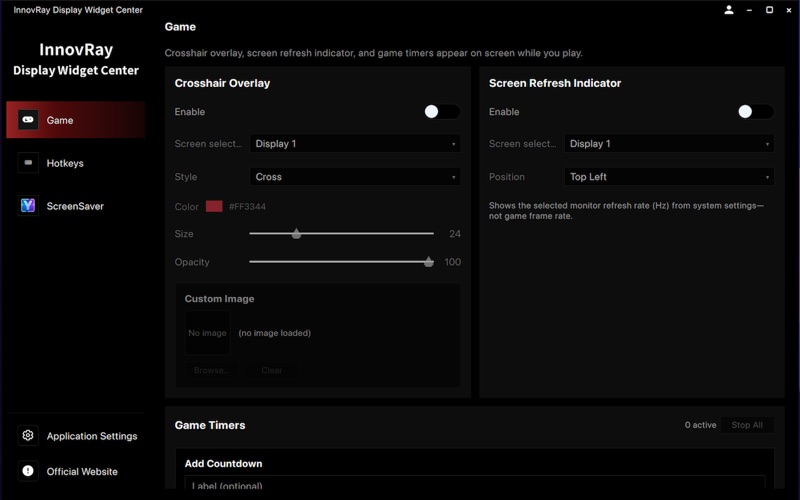
• InnovRay Display Widget Center — gaming overlays, shortcuts, and account hub
• InnovRay ScreenSaver — system monitoring and S
The official InnovRay macOS suite — one install, two apps, one account:

• InnovRay Display Widget Center — gaming overlays, shortcuts, and account hub
• InnovRay ScreenSaver — system monitoring and Smart Stage desktop customization

Install Display Widget Center once, launch ScreenSaver from the sidebar, and use a single sign-in for both. You can also continue as a guest to explore features that do not require an account.

INNOVRAY DISPLAY WIDGET CENTER

Control center for InnovRay on Mac. Explore gaming tools, window shortcuts, and your account — then open ScreenSaver for monitoring and Smart Stage.

• Game: crosshair overlay, refresh-rate indicator, and game timers
• Hotkeys: show the main window with a global shortcut
• ScreenSaver: launch the companion app from the sidebar; download the ScreenSaver user manual from Settings
• Account: email sign-in (serial number required at registration); shared with ScreenSaver. Delete your account anytime in the in-app account center.

INNOVRAY SCREENSAVER

Real-time hardware monitoring and Smart Stage desktop customization:

• System Monitor: live CPU, GPU, memory load and temperatures
• Floating Stats: overlay key metrics while gaming or working
• Smart Stage: visual editor for templates, widgets, and background effects
• Multi-Display: apply templates to popup windows or the desktop layer
• Templates and Widgets: built-in templates plus clocks, weather, albums, and more

Launch from Display Widget Center, or open ScreenSaver directly.

REQUIREMENTS

• macOS 12 or later
• Internet required for registration, sign-in, and optional downloads (for example the ScreenSaver user manual)

PRIVACY

Sign in with email. Your password is not stored locally. You can permanently delete your account from within the app.

Gaming overlays, shortcuts, live monitoring, and smart desktops — the official InnovRay suite for Mac.