QuackNotes is a fast, file-backed notes and code-snippet editor for Mac, iPhone, iPad, and Apple Vision Pro
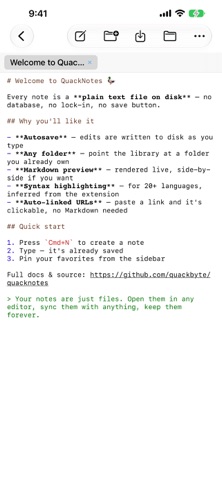
QuackNotes is a fast, file-backed notes and code-snippet editor for Mac, iPhone, iPad, and Apple Vision Pro. Every note is a plain text file on disk — there's no database, no proprietary format, and no explicit save button.

THE FILE IS THE NOTE
Notes live as real .txt, .md, or source-code files, either in QuackNotes' own library or in any folder you choose on disk. Point QuackNotes at an existing folder — including one kept in sync by iCloud Drive or another sync tool — and its contents show up as a browsable, collapsible folder tree.

WRITE AND CODE
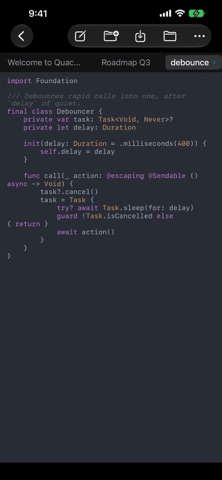
• Syntax highlighting for Swift, Python, JavaScript/TypeScript, Java, Kotlin, C/C++, C#, Go, Rust, PHP, Ruby, Shell, SQL, JSON, YAML, HTML/XML, CSS, and more, with your choice of 90+ color themes.
• Markdown notes get a live preview — or a side-by-side split with a draggable divider — covering headings, lists (including interactive checkboxes), tables, blockquotes, links, and fenced code blocks.
• A browser-style tab strip keeps every open note one click away; open tabs and your selection are restored the next time you launch the app.

STAY ORGANIZED
• Create folders and subfolders, drag notes between them, and give any folder a custom icon from a curated set of symbols and emoji.
• Pin your most-used notes to the top of the sidebar.
• Search by title or content from the sidebar.

MAKE IT YOURS
• Pick any installed font, size, and line spacing for the editor.
• On Mac, choose an opaque, translucent, or true Liquid Glass window background, and keep the window floating above other apps while you take notes over a meeting or video.
• Quick capture on Mac: summon QuackNotes from any app with a menu bar icon or a global keyboard shortcut.

Available in English, Spanish, French, and German.