
photo2movie
0.0 4.40MB 0 Limited-Time Free ¤68.00
Version v3.21
Updated 2026-07-14
Developer Jiulong Zhao



Description
Make movies with Ultra HD quality from your photos
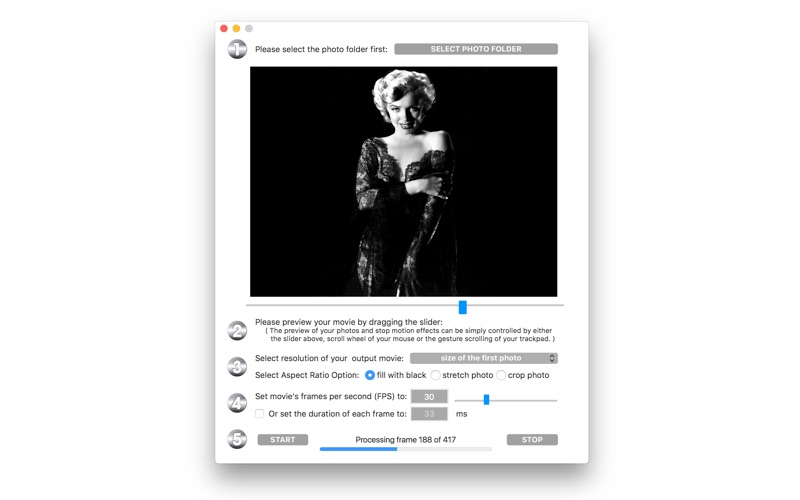
Make movies with Ultra HD quality from your photos! Hundreds of thousands of photos can be compiled into a high-quality movie with 4K, 8K Ultra HD resolution or better - all with just a few simple clicks. photo2movie is also an extremely efficient productivity tool for making stop-motion movies and animated films with a batch of photo frames. Features v2.06 - elegant preview function, you can preview your movie before even generating it; - preview function can be controlled by a slider, mouse scroll wheel, or trackpad gestures; - alphabetically sort and compile photos in a folder into a movie file; - supports .jpg and .png image formats; - custom frame rate setting: from 1 FPS to 100 FPS ( anything between 0.01 to 1 second display time per photo frame); - control the quality of your movie by preset resolutions; - movie resolution can be automatically set to the first photo’s resolution. - detailed progress indicator and frame counter; - compilation can be interrupted at any time and the already compiled parts will still be a usable movie file - 8 to 10 times faster conversion speed compared to other apps of ours. v2.06 -> v2.10 - specially optimized for OS 10.10 and OS 10.11 - processing speed improved by 20% or more compared with v2.06 - all deprecated functions are fixed and upgraded - tips and Q&A displaying better under lower resolution - the app is more compact in size - fix an issue of "progress indicator hidden after using interrupt stop" - color and size of the app's icon are modified - more by dragonBTV updated v2.10 -> v2.50 - more efficiency running on macOS Sierra - processing speed improved - interface re-designed - app's icon changed - major option added: select the movie's aspect ratio - Tip added related to Aspect Ratio Selection - Q&A updated - more by dragonBTV updated v2.50 -> v2.55 - fix the auto-layout issue on low-resolution devices - fix SF fonts display stretching issue on the guest account, change to system fonts - the black background of the photo preview is removed - protection added while opening a corrupted picture file - all alert windows changed to the white background-color v2.55 -> v2.57 - bug fixed: correct misspelling on the interface - startup tip modified - menu re-arranged for simplification - more by dragonBTV simplified - app size dramatically reduced - thread processing efficiency improved - performance improvements for macOS 10.13 High Sierra v2.57 -> v2.60 - MacBook Pro Touch Bar support added - a newer core for crystal clear color and processing efficiency - a cancel button was added to the movie file saving confirmation dialog v2.62 - corrupt photo file alert added v2.62 -> v2.81 - Any Mac (Apple Silicon, Intel) version for macOS Big Sur - interface fine-tuning for dark mode - bug fixed: FPS font color fades out in light mode - some alerts modified - all deprecated functions rewritten v2.81 -> v3.01 - interface modifried - touch bar support modified - More by dragonBTV menu updated v3.01 -> v3.21 - option added: movie can be auto opened after conversion - tips and Q&A moved to help window instead of an alert - app version displayed on either interface or menu label - feature added according to user request: setup menu button added to the interface for easy accessing - interface modified for the latest macOS 26 - App information updated for the new age-rating system - updated for the latest macOS Tahoe 26.5.2 compatible
Category: ()
Version: v3.21
BundleId: com.dragonbtv.photo2movie
Developer: Jiulong Zhao
Updated: 2026-07-14
