Style

Screenshots
7 screenshots Grid- Version
- 7.1
- Size
- 8 MB
- First release
- Jan 24, 2021
- Category
- Utilities
Description
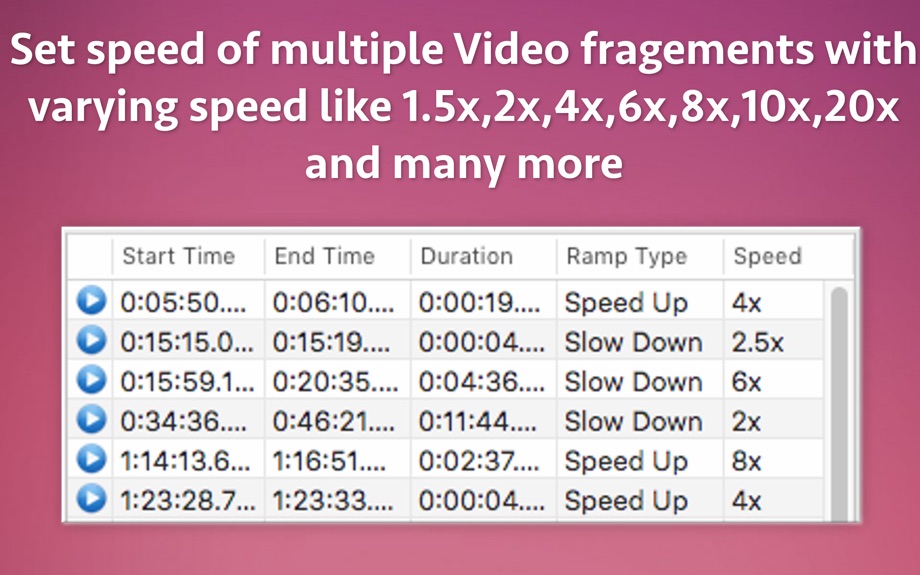
from the App Store listingSpeed up or Slow down multiple parts of the video in one go. Using the application, you can create Multiple Fast Motions and Slow Motions in the Same Video. You can mix the segments like first part as Slow motion, second part as Fast motion and third as Slow motion again.
You could slow down or speed up the videos in many different varieties as well.
For example :
-- You could set a part to slow down by 2x speed.This will reduce the play speed of the selected part of the video to half.
-- You could set an another part to speed up by 2x.This will increase the video play speed of the selected part by 2 times.
Various speeds like 1.5x,2x,2.5x,4x,4.5x,8x,10x,20x and many more are supported which helps in achieving the desired speed level.
You could speed up the video by 1.25x, 1.5x, 1.75, 2x, 4x, 8x, 10x, 12x, 14x,16x, 18x, 20x. The audio will also be sped up till 20x speed along with the video.
You could slow down the videos by 1.25x, 1.5x, 1.75x, 2x, 2.25x, 2.5x, 2.75x, 4x, 4.5x,6x, 8x, 10x and 20x. Up to 20x speed the audios will also be slowed down and the videos will contain audio at all slowed down speeds.
By increasing the video play speed, you could quickly go through the parts of the videos that are not that important and then start with normal speed on the important parts of the video.
To show more focus on a certain part of the video, you could slow down that part.
For example :
-- If you have encountered any funny moment in a video, you could slow down that part for fun.
-- You can use the app for improving your game of Tennis, swimming, running etc. You can use slow motion and see where the improvement is needed.
While speeding up and slowing down the video parts, the application also slows down/speeds up the respective audio from those parts.This gives a good video viewing experience.
The application supports precisions upto a fraction of second.When you select the start and end points of the parts of video, even the microseconds are considered.This makes sure that no frames are dropped and you get the highest quality possible.
The Videos could be controlled frame by frame. In order to traverse through a video frame by frame, move the mouse cursor over the playing video. A progress bar will appear. Now, use the left arrow and right arrow key to go through the frames.
The application supports MOV,MP4 & M4V video formats.
What users say
0 written reviewsNo written reviews yet
Share cards #
Instagram / Weibo / RED open the system share sheet with the generated card image
Video slow & fast speed Ramp
Utilities
$28.00
iOSAppGallerywww.iOSAppGallery.com


Video slow & fast speed Ramp
Utilities
$28.00
Scan to view
iOSAppGallery · iOSAppGallery.com
Discover iOS apps & games
Video slow & fast speed Ramp
Utilities
$28.00
Scan to view
iOSAppGallery · iOSAppGallery.com
Discover iOS apps & games
Video slow & fast speed Ramp
Utilities
$28.00
iOSAppGallerywww.iOSAppGallery.com


{"@context":"https://schema.org","@graph":[{"@type":"SoftwareApplication","name":"Video slow \u0026 fast speed Ramp","applicationCategory":"Utilities","operatingSystem":"iOS","url":"http://iosappgallery.com/en/share/1297567110","image":"https://is1-ssl.mzstatic.com/image/thumb/Purple114/v4/13/1b/8c/131b8c54-166e-3d5f-efa2-8a3fb3316f1a/AppIcon-0-85-220-0-4-2x.png/512x512bb.png","aggregateRating":null,"offers":{"@type":"Offer","price":28.000,"priceCurrency":"CNY"}},{"@type":"BreadcrumbList","itemListElement":[{"@type":"ListItem","position":1,"name":"Apps","item":"/"},{"@type":"ListItem","position":2,"name":"Utilities"},{"@type":"ListItem","position":3,"name":"Video slow \u0026 fast speed Ramp"}]}]}