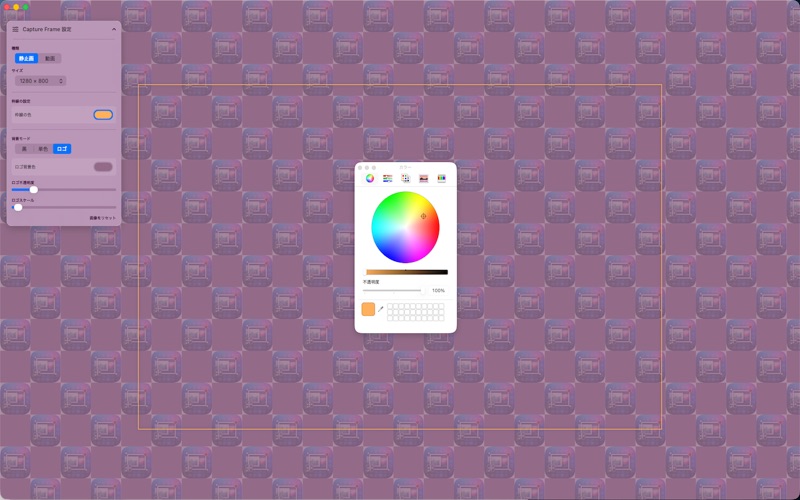
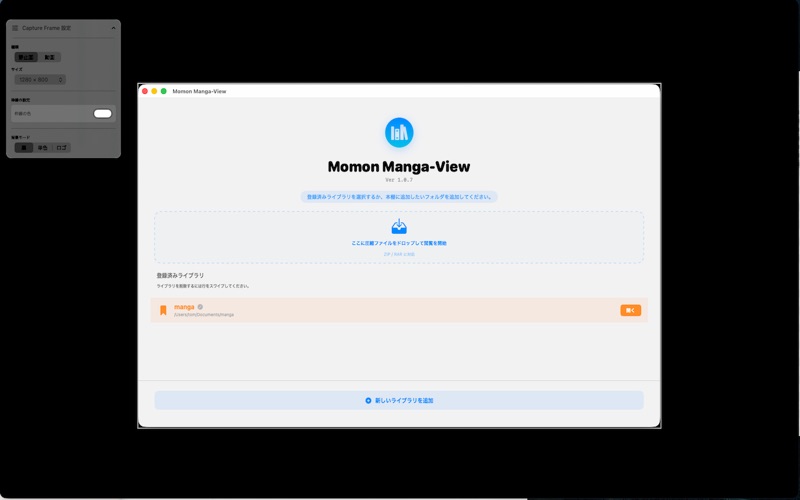
デスクトップアプリのスクリーンショットやApp Preview(デモ動画)を作成する際、規定のサイズや比率に合わせる作業を効率化する配置補助ツールです。
本アプリは、1280×800や1920×1080といった規定サイズの「視覚的なガイド枠」をデスクトップ上に表示します。この枠を「目安」として自作アプリのウィンドウサイズを調整したり、背景をデザインしたりすることが可能です。
【本アプリの活用フ
デスクトップアプリのスクリーンショットやApp Preview(デモ動画)を作成する際、規定のサイズや比率に合わせる作業を効率化する配置補助ツールです。

本アプリは、1280×800や1920×1080といった規定サイズの「視覚的なガイド枠」をデスクトップ上に表示します。この枠を「目安」として自作アプリのウィンドウサイズを調整したり、背景をデザインしたりすることが可能です。

【本アプリの活用フロー】

サイズの決定: 静止画や動画の規定サイズからガイド枠を選択して表示。

レイアウト調整: 表示された枠に合わせて、ターゲットとなるアプリのウィンドウを配置・調整。

キャプチャ: OS標準の画面キャプチャ機能を使用して撮影。

仕上げ: 撮影したデータを標準のプレビューアプリや外部の動画編集ソフトで最終調整。

【主な機能】
プリセットガイド: 主要なアセット規定に基づいた枠サイズを選択可能。
背景カスタマイズ: アプリの背後に単色やロゴパターンを敷き詰め、キャプチャ時の余白を補完。
多言語対応: 日本語、英語を含む複数言語に対応。

※本アプリ自体に画面キャプチャ(撮影・録画)機能は含まれていません。あくまで撮影時のサイズと位置を定めるための「デジタル定規」としてご利用ください。

English Description

This is a layout assistance tool designed to streamline the process of aligning window sizes and aspect ratios when creating screenshots and App Previews (demo videos) for desktop applications.

The app displays "visual guide frames" of regulated sizes, such as 1280×800 or 1920×1080, on your desktop. You can use these frames as a "reference" to adjust the window size of your own application or to design the background.

[Workflow]
Select Size: Choose and display a guide frame from the regulated sizes for static images or videos.
Adjust Layout: Position and resize your target application window to match the displayed frame.
Capture: Take the shot using the standard OS screen capture functionality.
Finalize: Perform final adjustments on the captured data using standard preview apps or external video editing software.

[Key Features]
Preset Guides: Selectable frame sizes based on major store asset regulations.
Background Customization: Fill the area behind your app with solid colors or logo patterns to complement the margins during capture.
Multilingual Support: Supports multiple languages, including Japanese and English.

*Note: This application does not include any screen capture (recording or still image) functionality itself. Please use it as a "digital ruler" solely for determining the size and position during capture.